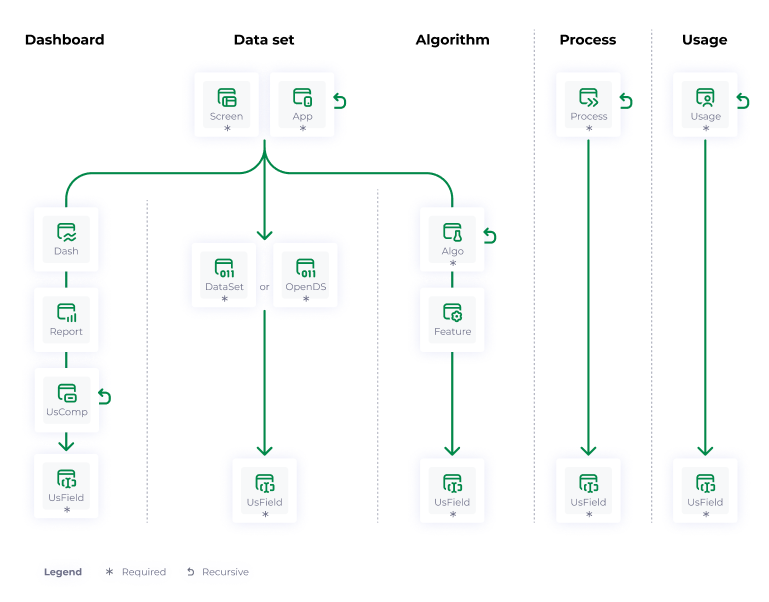
To document all your interfaces, we have provided you a set of objects:
- Application: represent the data available in a database, whether mobile, web, etc.
- Dashboard: to graphically represent glossary data from one or more models.
- Screen: are use cases via an interface: the display of elements on an application or ERP page for example.
- Algorithm: corresponds to a set of operations performed in a specific order to obtain a result from data provided as input.
- Dataset: correspond to collections of elements where associated data is stored, and where each value is associated with a variable.
- Open dataset: these are datasets whose access and use are left free to the public.
- Report: corresponds to a debriefing, a representation of information at a point in time.
- Feature: capacity, service provided by applications or screens.
- Usage field: this object allows you to describe the columns of a dashboard for example.
- Usage component: this object is used to cover the entire perimeter of the BI. It can be seen as a generic child, used to represent any element of a report, dashboard or screen (sheet, tab, graph, matrix, table, header...). It can even point to an existing component (sub-report, report tiles...).We have decided to limit the attributes in the component's object card because it may evolve in future versions.
- To allow DPO of companies to ensure GDPR compliance, we propose you the usage object that will allow you to keep your record of processing activities up to date.
- To identify all your processes within your company, we have provided you the process object.