
Introduction
To use data and extract business value from it, it's vital that the data is of the right quality.
Hence, measuring the level of data quality and making test results available to users is also an asset when it comes to democratizing access to data. Tracking it over time provides information on the reliability of the dataset. Notification of any change in a dataset's quality status means that the necessary steps can be taken as quickly as possible to reduce the time needed to remedy any problems.
The process starts with the definition of business rules, which characterize the level of data quality. Depending on usage and business constraints, these rules may concern several aspects of the data, such as its integrity, freshness or completeness. Expressing these rules in natural language enables all players to be involved in the data governance process, including business and technical profiles.
DataGalaxy data quality monitoring overview
How it works
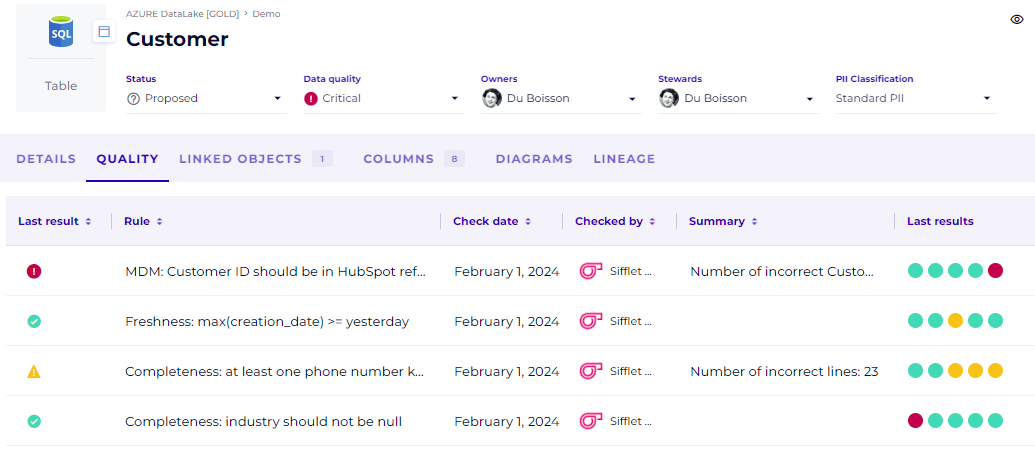
DataGalaxy's data quality monitoring functionality will enable you to send to the platform the results of quality tests carried out by an external tool. DataGalaxy does not access your data and does not perform quality tests directly. Instead, the results of each quality rule are fed back into the platform, so that this information can be shared with users and any necessary actions can be taken as part of a data quality governance process.
For now, quality rules and tests are presented in an additional tab on the Dictionary's Table and View objects.
Quality rules and test results ("checks")
When creating a quality rule on a Table or View, the following information is requested:
- code : the rule's external identifier, from your testing tool, unique in a workspace ;
- rule: expression of the rule (preferably in natural language so that everyone can understand it) ;
- type : one of the 6 dimensions of data quality :
- completeness,
- accuracy,
- consistency,
- validity,
- unicity,
- integrity.
When a data quality test result relating to a rule on an object is brought up, the following information is requested:
- status: test result :
- "Passed" if the result of the test is ok,
- "Warning" when the result deserves attention but is not a failure,
- "Failed" when the test is a failure,
- "Unknown" when the test has not been ran correctly and the result is unknown,
- message: a short message providing additional information on the test result;
- detail: more detailed information to help solve the problem, such as an extract of the data in error or a more complete error message.
The data quality status
Each test result reported to the platform is linked to a quality rule (itself linked to a Table or View object). Each rule has a status, which corresponds to the last test result reported for that rule.
All the statuses of the various quality rules are aggregated to determine the overall quality status of the object (Table or View). This status is an attribute of the DataGalaxy metamodel and can therefore be used like any other attribute.
This status can take four values:
- "Unknown" when no quality status information is available (no test results are known);
- "Ok" when the status of each quality rule is "Ok";
- "Warning" when at least one rule is in "Warning" status;
- "Critical" when at least one rule is in "Critical" status.
React quickly to data quality problems
The quality status of tables and views can be used to expose the quality level of the table (or view) to users, for example by adding it to the header of the object record, by displaying it as a column in a tabular view of an object list, or as a filter in an object list.
This makes it quick and easy to get a global view of all tables and views that may not be at the right quality level, for example by creating a filtered view displaying all objects with "Warning" or "Critical" status.
To be alerted to a change in data quality status, simply use the object's "Watch" function, which triggers notifications when a modification is made to the object, including the quality attribute.
Using DataGalaxy's data quality monitoring functionality
Set up
Here's how to set up the functionality:
- Add the "Data Quality" attribute to the section of your choice on your Dictionary Table and View screens
- Define and implement data quality rules in an external tool, off-the-shelf or in-house solution
- Use the DataGalaxy API to develop the interface for uploading rules and test results to the platform
- Schedule the execution of tests in your systems and benefit from the results in DataGalaxy
The REST API
Currently, the interface for creating rules and reporting quality test results is a REST API. This enables programmatic integration with any data quality testing solution you may have implemented in your context, such as Sifflet, Soda, Great Expectations, or any other vendor or in-house solution.
The rules are represented by the entity "Rule", and the test results by the entity "Check".
You'll find all the information you need to get started with our API in this Getting Started Guide.
The REST API for data quality is described in the DataGalaxy's API documentation.
Note: to authenticate your API data quality client, we recommend that you use an integration token rather than a personal token, in order to benefit from the full range of features (in particular, for use of the object's "follow" function). The token used must have access to the relevant workspace and Contributor permissions on the dictionary sources on which you wish to create rules and test results.
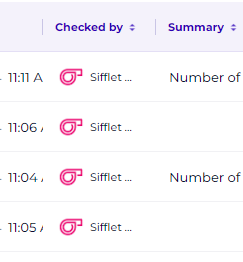
By creating a dedicated integration token for this purpose, you can also customize its name and logo, so that it reflects the data quality tool you're using to carry out the tests. In our example, this is Sifflet:
Note: the base url of the API endpoints is available in your Profile menu > DataGalaxy API in the platform. It generally looks like https://[instance].api.datagalaxy.com/v2 . Please read the Getting Started Guide for additional informations.
Note: as of today, the permissions model has not been implemented in the data quality module. The only necessary permission required for creating/deleting rules and checks is a Steward license. The permissions are not bind to the permissions of the related objects in the metamodel. We are aware of this limitation and have this topic in sight for the evolutions of the product.
However, if the token used for creating the checks has not the contributor permissions on the objects related to the rules, the check will be created/deleted but the data quality status of the object will not be updated because it's an attribute of the metamodel and that's the reason why the API will return an error.
How the Data Quality API works
All endpoints are described in the DataGalaxy's API documentation.
Frequently asked questions
What is the retention period for data quality tests?
Currently, data quality tests are not purged. API routes can be used to remove tests or rules that you no longer wish to present in the platform.
How does the data quality feature works with versioned workspaces?
In a versioned workspace, the data quality status is updated automatically by the tests results (checks) only in the "default" version, meaning your official one if available
The status of the rule and the status at object level don't match the last result of the check on this rule, why?
We have a known refresh issue when you open the list of checks of a rule and manually delete the last rule from the interface. The status of the rule will be the right one, but the list of checks and the quality status of the object won't be updated. It's just a display issue and refreshing the page will fix this. The real statuses in the platform are the right one.
A similar behavior can happen if, for testing, you send multiple checks with different statuses but with the same timestamp. As the "last" check is determined by date, having the same timestamps for different events can lead to inconsistencies. It will not happen in real so we don't consider this as a blocking issue.