
Overview
This article illustrates how to create a semantic model in Snowflake Cortex Analyst using a finance-related proof of concept. The example is built on a Snowflake tutorial and demonstrates how to leverage DataGalaxy to define business concepts, structure tables, and enable natural language querying.
Sample Natural Language Questions
Using a semantic model, Cortex Analyst can interpret questions like:
"What are the new 2022 clients who had upsells in 2023 and then in 2024?"
"What are the invoices from 2024 with services from previous years?"
These types of queries require logical mapping of dimensions, time fields, and relationships between various data sources.
Involved Physical Tables
The following physical tables from Snowflake are involved in this proof of concept:
dim_customer– Customer dimensiondim_invoice– Invoice header datadim_invoice_line– Line items in each invoicefact_tracking_arr– Fact table for ARR tracking
Example YAML Snippet
Here’s an example snippet from the semantic model YAML file:
name: Finance
description: Semantic model for finance-related queries

tables:
  - name: customer
    description: Customer information
    base_table:
      database: cortex_analyst_finance_poc
      schema: finance
      table: dim_customer
    dimensions:
      - name: customer_id
        description: Unique customer identifier
        expr: customerid
        data_type: text
        unique: true
This defines a logical table named customer, maps it to the physical table dim_customer, and identifies customer_id as a key dimension with a unique constraint.
Asking Questions via Cortex Analyst
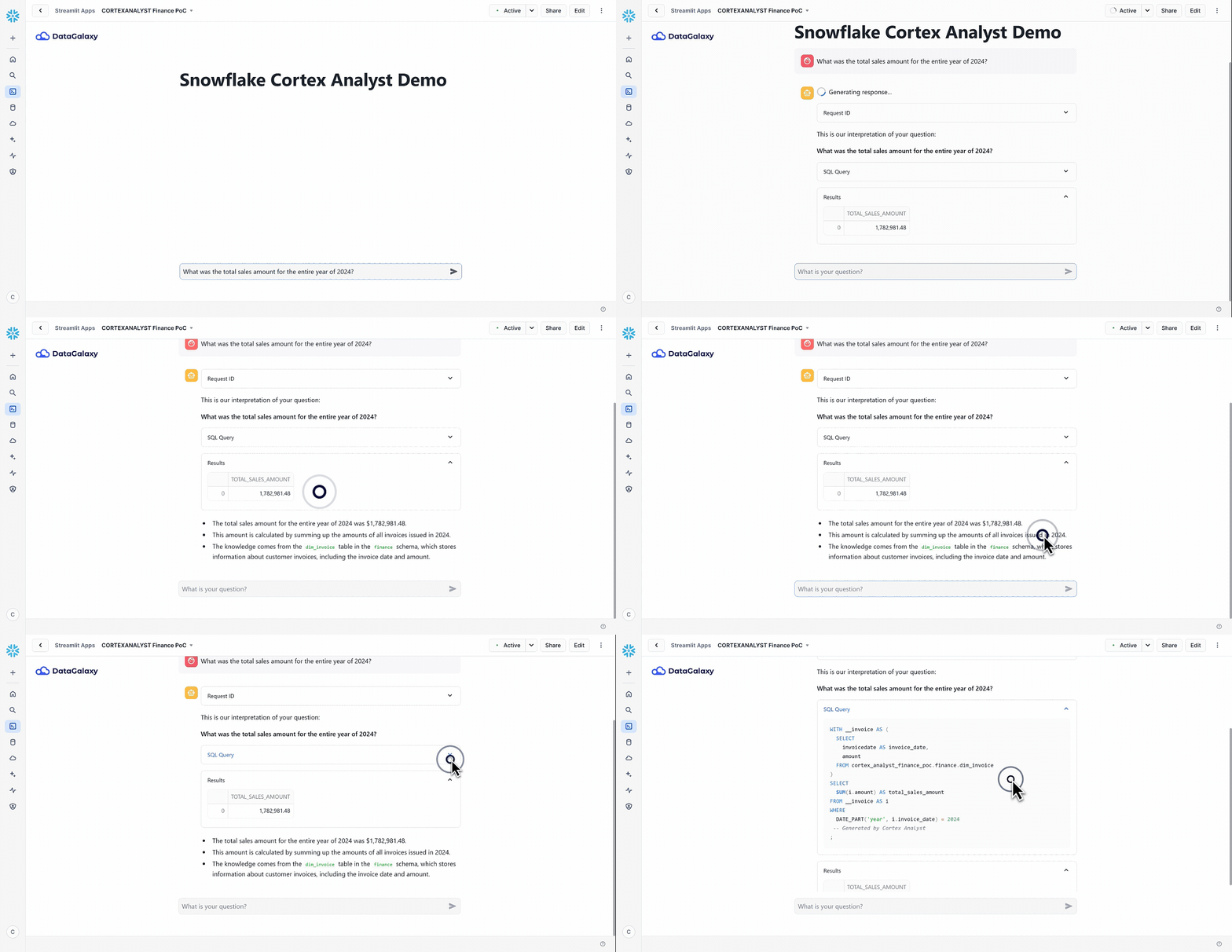
Once the model is deployed, users can begin querying with natural language:
Example 1: Unpaid Invoices in December 2024
Query:
"Which invoices issued in December 2024 are still unpaid?"
Result:
Cortex Analyst generates a SQL query using the model’s defined logical-to-physical mappings, identifying invoices issued in December 2024 and filtering for those with a payment status of "Unpaid".
Example 2: Revenue from Services Only
Query:
"What is the revenue from services only?"
Result:
The model applies the appropriate measure and filters based on predefined logic (e.g., filtering by service type), returning the correct revenue figure.
Tips & Tools
Snowflake Documentation: Refer to the official Snowflake Cortex Analyst specification for detailed model definitions.
YAML Generator: Use Snowflake’s semantic model generator tool to speed up YAML creation.
Streamlit Template App: Explore the Streamlit app template provided in Snowflake’s Cortex Analyst tutorial for quick integration and testing.
Conclusion
This finance proof of concept illustrates the power of combining DataGalaxy with Snowflake Cortex Analyst to create a semantic model that supports meaningful, business-driven analysis. By defining dimensions, measures, and relationships in YAML, you can enable accurate and intuitive natural language queries for end users.
Manual work is still required for elements like joins and synonyms, but DataGalaxy’s glossary and lineage tools significantly streamline the setup process. With this example as a reference, you can confidently build your own robust semantic models for various business domains.