
Our public API exposes "bulktree" routes that gives you the possibility to create multiple entities (and their children) in your modules.
Already existing entities will be updated.
You can create up to 250 000 entities by request.
Let's populate our catalog with this method.
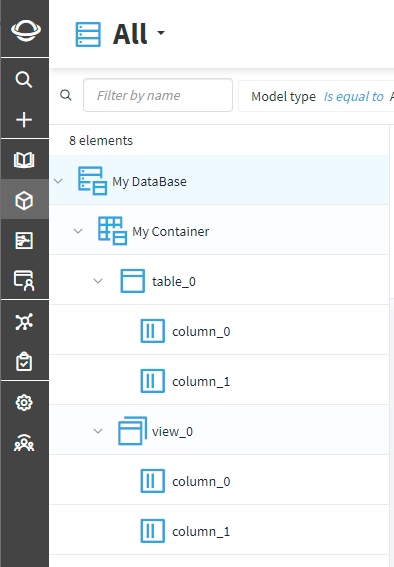
We will create 8 entities:
- 1 source (My DataBase)
- 1 container (My Container)
- 2 structures (table_0 et table_1)
- 4 fields (column_0 and column_1 for each structure)
We are going to call POST /sources/bulktree/{versionId}. *versionId corresponds to the target version of your workspace.
Here is our payload:
{
  "name": "My DataBase",
  "type": "Relational",
  "summary": "Database summary",
  "Custom Property": true,
  "description": "Database description",
  "owners": ["master.data@datagalaxy.com"],
  "stewards": ["master.data@datagalaxy.com"],
  "tags": ["GDPR"],
  "children": [
    {
      "name": "My Container",
      "type": "Model",
      "summary": "Container summary",
      "children": [
        {
          "name": "table_0",
          "type": "Table",
          "children": [
            {
              "name": "column_0",
              "type": "Column"
            },
            {
              "name": "column_1",
              "type": "Column"
            }
          ]
        },
        {
          "name": "view_0",
          "type": "View",
          "children": [
            {
              "name": "column_0",
              "type": "Column"
            },
            {
              "name": "column_1",
              "type": "Column"
            }
          ]
        }
      ]
    }
  ]
}
Just like basic entity creation, you can define the custom attributes' values of your entities.
In the above payload, our source ("My DataBase") has a custom attribute named "Custom Property" of type boolean that we set to true.
The children property defines the hierarchy between your entities.
In the above payload, the children property of "My Container" defines its children entities (table_0 and table_1).
"My Container" is defined in the children property of "My DataBase", therefore "My DataBase" is its parent.
Once the request was executed, the server responds with the following:
{
    "total": 8,
    "created": 8,
    "updated": 0,
    "deleted": 0,
    "unchanged": 0
}
And here are our entities in the DataGalaxy application:
Bulktree exists for every modules:
- Catalog: (create 1 source and its children)
POST /sources/bulktree/{versionId}
- Glossary: (create multiple properties and their children)
POST /properties/bulktree/{versionId}
- Uses: (create multiple uses and their children)
POST /usages/bulktree/{versionId}
- Data Processings: (create multiple data processings, their children, and their mapping)
POST /dataProcessing/bulktree/{versionId}