
The purpose of this article is to explain how the breadcrumb is working.
The breadcrumb represents the tree structure of the pages that the user has traversed from the home page of the clientspace. (from the workspace home page for monoworkspace clients).
Location
The breadcrumb is located at the top left of the page, just to the right of the cloud in the whole application (except in the administration part).
Composition
The breadcrumb consists of :
- The client (except monoworkspace clients)
- The workspace
- The version (if existing)
- The module
- The filtered view (if applied)
How it works
The breadcrumb allows direct parent navigation, as well as transversal navigation.
Indeed you have the posibility:
- to be redirected to a parent page by clicking on its label in the breadcrumb.

- to be redirected to a transverse page by opening the drop-down list thanks to the small arrow to the right of the page label.
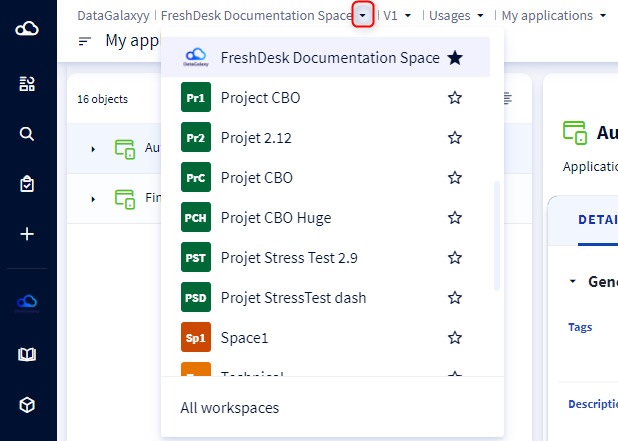
Redirections
When you click in the breadcrumb on:
- the client: you are redirected to the home page of the clientspace
- a workspace: you are redirected to the home page of the selected workspace. If the workspace is versioned, then you will be positioned in this order of priority on the:
- favorite if existing
- official if existing
- most recent candidate if existing
- most recent working
- a version: you are redirected to the home page of the parent workspace in the selected version.
- a module: you are redirected to the object list of the selected module of the workspace in the current version.
- a filtered view: you are redirected to the object list of the selected filtered view of the workspace module in the current version.