
Duplicating information from one workspace to another is not possible in DataGalaxy. To perform this action, you must either export/import CSV files or use the API.
To help our clients carry out this action, we have developed an open-source tool available to everyone. This page is here to help you use it. Information about the tool can be found here: https://github.com/datagalaxy-lab/datagalaxy-toolbox.
Disclaimer : as an Open Source tool, it is not part of the Datagalaxy plateform and commercial offer. Thus, we can't provide support on it. Please don't hesitate to participate and help bringing in this tool the missing features you need.
If certain permissions are required on your computer to use it, this page will guide you to do so without specific coding knowledge.
Note: If you have the skills, feel free to help us improve this tool!
Tool Usage Information
The tool comes as a .exe file. There is nothing to install, but you must have execution rights for this type of file. There is no graphical interface; everything must be run through command lines.
We will therefore create a command line to launch the file execution.
Prerequisites:
- Access to the command prompt (search "cmd" or "powershell" in the Windows menu or press Windows+R, then type "cmd" or "powershell").
- Ability to run the .exe (specific rights may be required).
Known Limitations:
The limitations are those related to the API. It is therefore not possible to copy:
- synonyms
- rich text formatting
- images
- diagrams
- "golden" links
Create the Command Line
Step 1: Understand the command line
A command line consists of several parts:
- the executable being called
- the feature being called
- the parameters (which vary depending on the feature)
- the value of each parameter
Example:
.\datagalaxy-toolbox.exe copy-glossary --url-source %url-source% --token-source %token_source% --workspace-source %workspace-source% --workspace-target %workspace-target%Step 2: Retrieve the parameter values
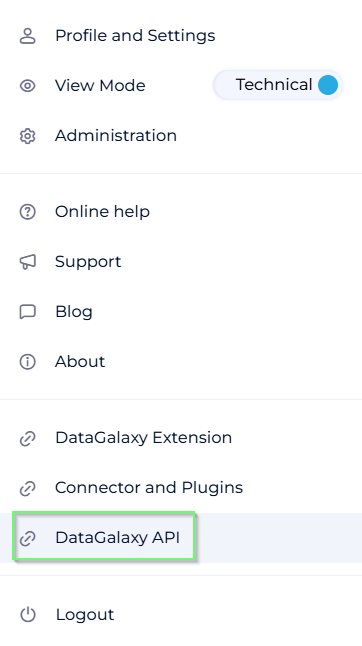
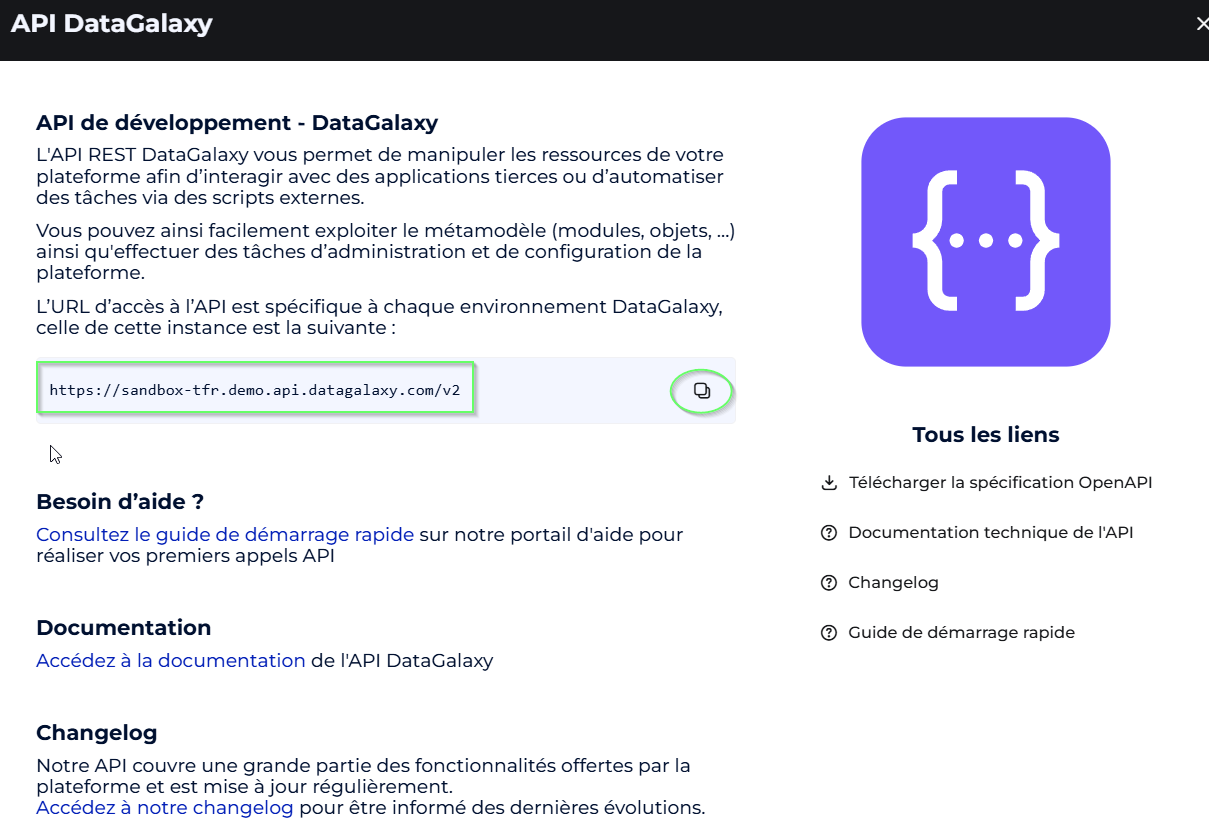
url-source: corresponds to the API URL of your environment.
 | ⇒ |  |
token-source: personal access token or generic token (administrator).
Documentation: Freshdesk documentation.
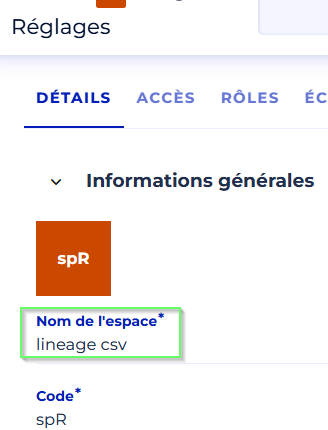
workspace-source and workspace-target: names of the source and target workspaces (see workspace settings page).
Step 3: Create the command line
- Start with:
.\datagalaxy-toolbox.exe - Add the feature:
copy-glossary - Add the parameters (values in quotes):
.\datagalaxy-toolbox.exe copy-glossary --url-source "https://sandbox-tfr.demo.api.datagalaxy.com/v2"Step 4: Run the command line
Open cmd or PowerShell, navigate to the executable's directory, and run the command.
A summary of the objects found/created/modified will be displayed.
Available Features
Complete list: GitHub. Extract (subject to change):
Between 2 client spaces
- Delete / Copy custom attributes
- Copy technologies
Between 2 workspaces
- Copy screens
- Delete / Copy glossary objects
- Delete / Copy dictionary objects
- Delete / Copy processing objects
- Delete / Copy usage objects
- Copy relationships between objects
Tip: Copy all modules first, then the relationships.
Going Further
You can chain commands in a ".bat" file:
call .\datagalaxy-toolbox.exe copy-glossary --url-source %url-source% --url-target %url-target% --token-source %token_source% --token-target %token_target% --workspace-source %workspace-source% --workspace-target %workspace-target%
call .\datagalaxy-toolbox.exe copy-dictionary ...
call .\datagalaxy-toolbox.exe copy-dataprocessings ...
call .\datagalaxy-toolbox.exe copy-usages ...
call .\datagalaxy-toolbox.exe copy-links ...
pause