
The screens of a workspace are defined at the Client Space level but they are also configurable at the workspace level.
To understand how to customize the screens, you can consult the following articles:
Administrators have the ability to reset the screen configuration and return to the initial configuration, i.e. the Space Client configuration.
From the workspace on which you want to reset the screens:
- In the vertical navigation bar, click on Settings.
- Click on the Screens tab.
3. Click on the module/object pair for which you want to reset the screen.
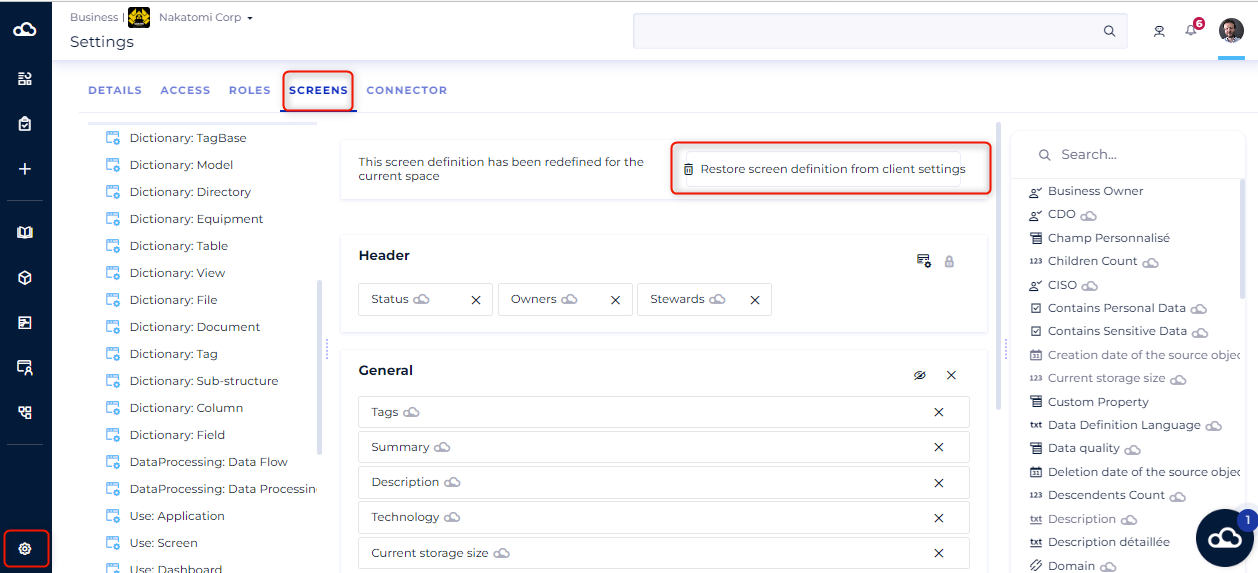
4. Click on the button Restore screen definition from client settings.
Note: The screens will inherit the settings made at the main administration level, that of the Customer Centre at the time T.