
You have set up screens in the customer area and you do not find the same configuration in the workspace?
This is an inconsistency regarding the inheritance logic of screen customization at the client and workspace levels.
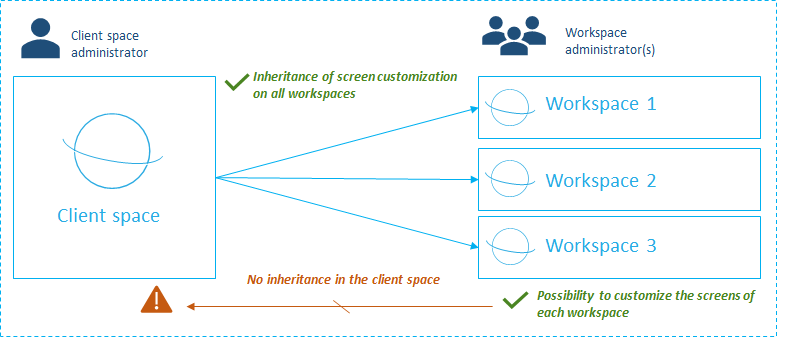
Indeed, as an administrator of the client space, you can customize the screens of all the objects in each module. Customization at this level will have an impact on all available workspaces.
On the other hand, if workspace-level administrators can also customize their screens to fit a particular project, customization at this level will have no impact on other workspaces.
Customization at the client space level is, therefore, default customization that can only be modified at the workspace level. It is, therefore, possible to have inconsistencies if the settings at the workspace level are not relevant.
The solution?
- Check the customization of the screens both in the customer area and in the workspace
- Reset the configuration of the workspace screens to return to the initial configuration, i. e. the client workspace configuration. Consult this article for details on how to reset the screens.
To go further and understand how to customize the screens, you can also consult the following articles: