The objective of this article is to introduce you to the concept of the workspace: on what basis to make the settings and how to take advantage of the features
The following elements are described in detail in additional articles:
What is a workspace?
DataGalaxy aims to operationalize data management. The platform is therefore built in order to be able to map perimeters that are easy to understand, and therefore smaller or well-defined perimeters.
However, starting small does not mean:
- Be the only initiative: indeed, it is quite conceivable that several mapping initiatives are taking place at the same time.
- Include the whole society: maturity and needs (granularity, depth, etc.) are different from one initiative to another.
- Not to have in terms of other completely different domains
Data Galaxy, therefore, has two levels of management:
- Clientspace,
- Workspace, which is generally defined according to the scope of the client's project(s).
The objective of being able to create one (or more) workspace is to be able to organize the governance of its data by business lines or themes and thus to advance step by step with a reasonable amount of data to be processed for each project. It is thus possible to create workspace:
- By business services: marketing, human resources, finance,
- By theme: compliance with DGMP ...
- By project: development of a new data warehouse ...
- By data domain: customer, supplier, product ...
Workspaces have been created to facilitate team productivity. Thus they allow to manage:
- A team in which each member has his or her role and authorizations that can evolve as needed.
- Screens in which the administrator can create data representations that meet the needs of the domain.
- Integration with collaboration tools.
Note: attributes, as well as users, are inherited from the space client.
Who can access these two spaces?
The objective of the workspace is to be able to collaborate on a limited scope. The appointment of a single administrator remains interesting because it is necessary to:
- Avoid that everyone modifies screens that should benefit all the team.
- Be able to manage different levels of authorizations according to the maturity of each individual
- Speak in one voice with the clientspace administrators for all notions inherited from it: attribute creation, tag enrichment, user invitation ...
Depending on the complexity of the platform's use, it may be interesting to separate this role from that of the clientspace administrator, but it is not a technical prerequisite.
Access is restricted to users who are registered as administrators. Non-administrator users do not see both buttons.
What are the inheritance rules between the clientspace and the workspace?
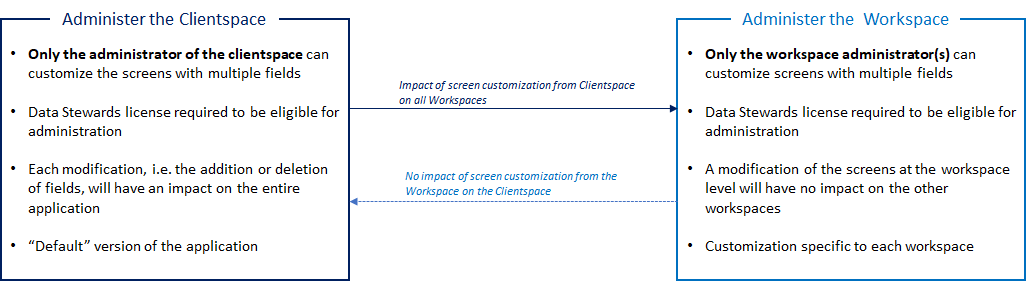
Custom settings in one workspace have no impact on the clientspace or other workspaces.
This is the customization of a single workspace in which the administrator can, for example, add or delete fields and thus make his workspace more relevant to his needs.
The diagram below summarizes the main characteristics of clientspace and workspace and the non-reciprocal inheritance relationship: