
The attributes, to define the different facets of the context, are the basic elements of a data governance strategy.
The purpose of this article is to explain the notion of attribute and to describe how it works in the DataGalaxy platform.
To know how to create and delete attributes, you can refer to the article Attribute Management.
What is an attribute?
One of DataGalaxy's missions is to make the different Data profiles (Analysts, Dev, architect, business, producers, consumers...) collaborate around a shared vision of the different facets of the data. This involves managing different types of heterogeneous information. Attribute management addresses this need. They correspond to fields which, once grouped into categories, making it possible to establish an object identity card or the object card.
The objective of attributes is to be able to contextualize as much as possible the different facets of an object and thus to enrich its knowledge.
In order to support the data governance approach (corporate vision), attributes are created at the Client Space level. This means that they are common to all workspaces depending on this customer space.
It is important to ask yourself a few questions before you start creating dozens of attributes:
- What is the proportion of users concerned with the information carried by the attribute?
- What are the critical attributes for your use case, which need to be cured?
- Is the meaning of the attribute explicit? for example, what does the attribute "frequency" mean? is it the update frequency? the data deletion frequency?
- Does this attribute not already exist or does it largely cover another attribute? It is advisable to converge the terms as much as possible so as not to end up with several interchangeable fields, which would be a source of confusion.
- Completeness of the values proposed in the attribute list? some types of attributes contain lists of values: this one must be rich enough for everyone to find their way around but not too rich to avoid getting lost.
- Which language should we use? The platform is available in French and English, but the values positioned on the attributes can be in any language, which one should prevail? Should we create the attribute in both languages?
- Are there any attributes specific to a domain, pole or project? Should management be delegated?
- .....
Tips
There is no limit to the number of attributes that can be created. However, it should be kept in mind that 20% of the attributes carry 80% of the knowledge expected by data users.
The multiplication of attributes can be counterproductive and discourage users (poor ergonomics, lack of understanding of differences, the complexity of maintenance...).
To maintain an optimal level of ergonomics, we recommend evaluating the ROI of creating and displaying each attribute.
How does it work?
The diagram below summarizes the attribute structuring in DataGalaxy:
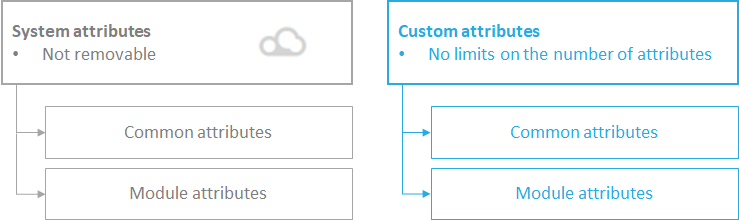
The attributes are structured into two main families:
- System attributes
In order to ensure a quick start, DataGalaxy offers and maintains a number of attributes, known as system attributes.
These are attributes available "by default", which cannot be modified by users. They can be identified by the cloud icon next to their name.
Some system attributes allow you to view data from source tools, for example the number of records in a table or the source query of a data set. The information returned depends on the source tools, you will find the details in the articles of the concerned technologies
- Custom attributes
These are the attributes created and managed by the administrators of the clientspace, they are usable/available for all workspaces of the clientspace.
Consequently, any modification or deletion of a custom attribute will impact all workspaces that use this attribute.
Two types of attributes can be proposed in each family:
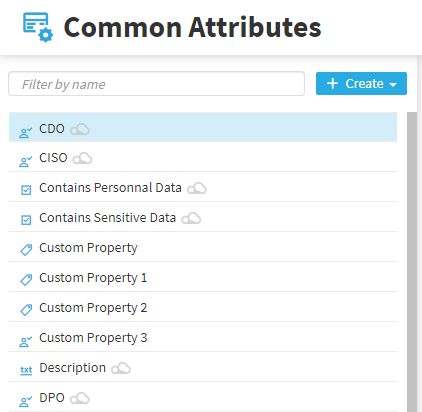
- Common attributes
They correspond to the attributes that are usable/available for all objects on the platform, regardless of the module to which the object belongs.
Example: The description of the object, the DCP classification, the responsible person,...
- Module attributes
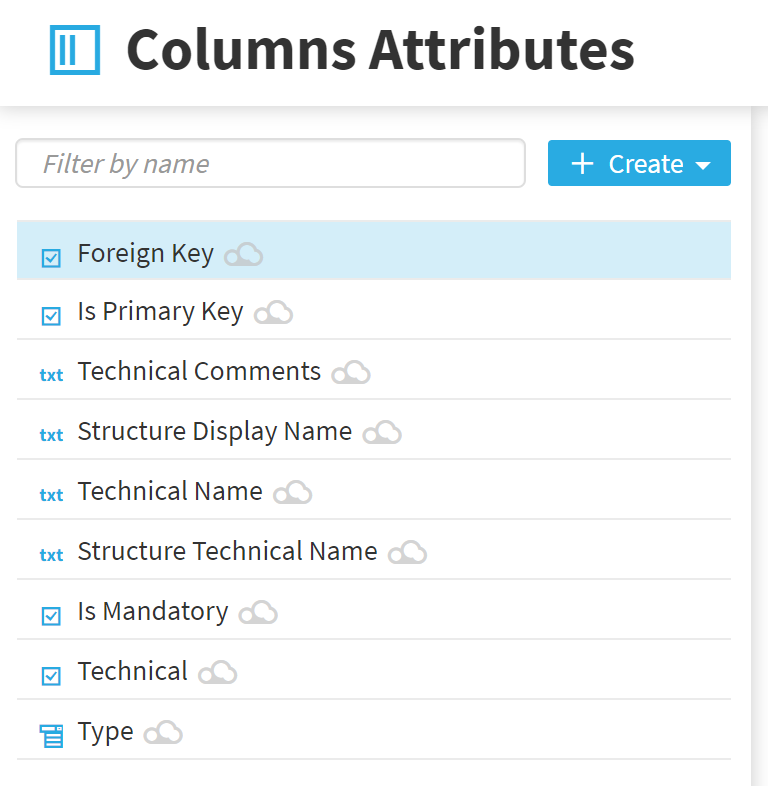
They correspond to specific attributes that are not exclusively usable/available for a subset of platform objects.
- Specific attributes for Glossary objects,
- Specific attributes for Data Sources (DBD, FileStore,...),
- Specific attributes for Structures (Table, File, ...),
- Specific attributes for Fields (Column,...),
- Specific attributes for Uses,
- Specific attributes for processing objects.
The structure of an attribute
All attributes, regardless of their type or their format, share a common definition base:
- Attribute label,
- Description of the attribute,
- Attribute format (text, date, label...),
- The Recommended option which allows you to calculate the completion rate of the object,
- The default value (optional).
Supported attribute formats
Formats | Description | Comment |
|---|---|---|
| Boolean | The attribute is in the form of a Yes/No field | Example of Boolean type fields:
|
| Date | The date attribute is in dd/mm/yyyyy format | All information in date format. |
Formatted text | Rich text attribute with formatting tools | Formatted text is to be used for attributes that require a long description or advanced formatting of content. |
| Hyperlink | Allows you to insert a link to external references | For example, in the context of a GDPR project, the hyperlink field can be used to link to the CNIL's Privacy Impact Assessment tool |
| Number | The field in format Number | It can be an integer or a decimal number |
| Value list | Single choice-value list | |
| Text | Plain text field | Attributes of this type are limited to 512 characters. |
| Tag | Classification attribute Each tag created has a color that allows you to easily identify the group to which the object tagged with this tag belongs. | Example of classification: Marketing, Sales, Finance, HR |
| Multi-value list | Multiple choice field | Multi-value list works like Tags. |
| Users | Multiple choice field with a list of users in the customer area as a value list | |
| Person | Multiple choice field with a list of users in the customer area as a value list | The type used is the attribute definition to identify stakeholders and external actors |
| Hierarchy | Fields with a list of multiple-choice hierarchical values | |
| Time series | Fields allowing to follow the evolution of a value in time | Example : a quality indicator |