
The goal of this article is to explain the concept of data import: how it works? what data can be imported? who can do it? What are the impacts on the other features offered by DataGalaxy?
What is the purpose of importing data?
One of Data Galaxy's main objectives is to provide a coherent and exhaustive overview of the data available within the scope studied. However:
- The large volume of data to be processed often makes a unitary approach to data intelligence complex and time-consuming. Indeed, who could be sure to have filled in all the tables and fields of a database, especially when it contains more than 10000 of them?
- The pre-existence of a mapping file requires that these documents be easily retrievable.
In this context, two elements of ownership seem to be the key:
- The ease of information about the mass solution.
- The ability to quickly capitalize on pre-existing work.
DataGalaxy, therefore, offers the following import capabilities:
- The ability to import of CSV files of metadata.
- A connector that allows you to build these CSV files or manage the import directly via API: for more details on this capability, see this article.
- An Online connector that allows you to bring up the metadata of your sources directly from the platform; for more details on this capability, see this article
- Importing elements into the Glossary from a DataGalaxy Dictionary data source, for more details on this ability consult this article.
How does the import work?
The import will allow you to create or update information, However, it cannot allow delete objects.
The data update works in incremental mode:
- The technical name serves as the key.
- The following fields will only be updated if there are values: summary and description.
- If the field is mapped at import, the other fields will be loaded (in overwriting/replacing mode).
The tool allows you to export all data. As part of an import strategy, this may allow for some flexibility:
- Obtaining an input mask.
- retrieval of the elements filled in for mass modification (Note: this function is available natively on the platform).
This requires special care when loading: didn't I delete values I wanted to keep? for example.
Where can I import data?
All DataGalaxy modules are configured to be able to import data:
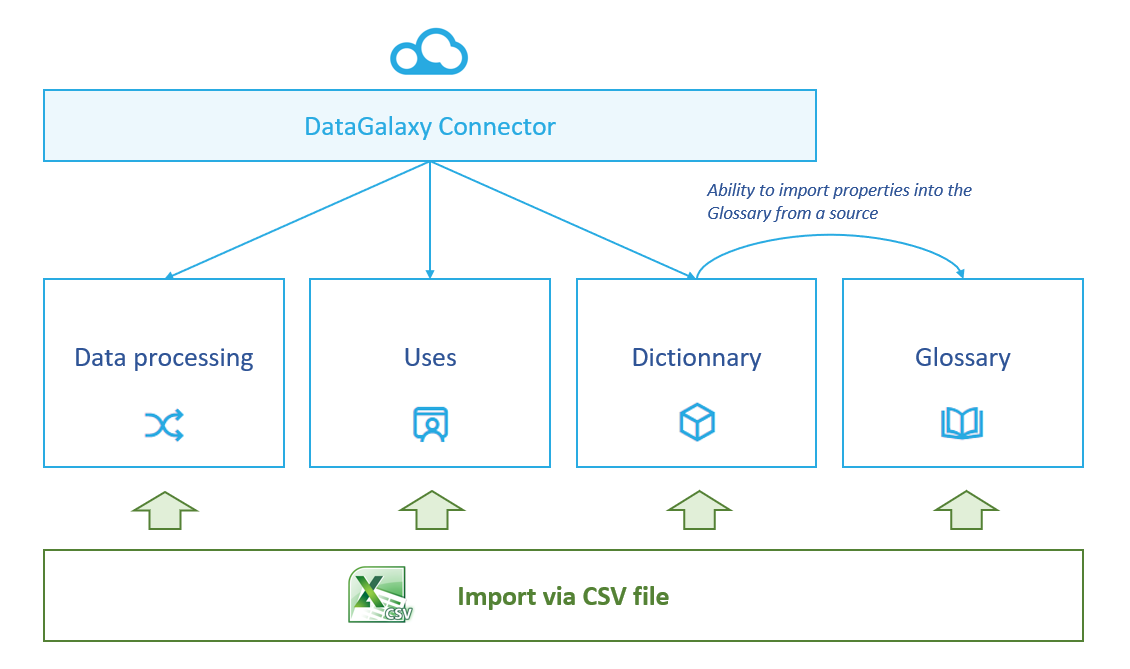
The followings articles explain the import via CSV file modalities by modules:
- Import objects and links in glossary from CSV file
- Import objects and links in uses from a CSV file
- Import Data Processings from csv files
- Import data sources in Dictionary from CSV files
To understand more precisely the concept of Module, you can consult this article.
Who can import data?
From a tool point of view
- Only users with a Data Steward license are eligible to import data into DataGalaxy (To know the different licenses offered by DataGalaxy, you can read this article.)
- The ability to import data will also depend on your workspace permissions. You need to have a level Administrator on the module you want to import objects on. For the dictionary module it is possible to authorize database by database the data imports
To understand how authorizations work, see this article.
From a functional point of view: the ergonomics of data imports makes it possible to address all types of profiles. Moreover, since imports are carried out workspace by workspace, there is no systemic risk.
Nevertheless, due to the significant impacts of these imports, it is preferable to reserve them for an informed profile. Not only could data be inadvertently overwritten, but there is also the question of modifying objects for which the user is not the most competent. A good practice is to identify responsibilities by a module within the same workspace:
- Rather functional profiles to manage glossary imports. More IT profiles can be added for the connection with the basic fields.
- Administrator profiles for unitary management of the databases (each base referent has the authorizations to manage his database).
- ETL administrator profiles for processing.
- MOA profiles for usage administration.
How does data import impact screen settings?
The object master record is set up at the customer space level. It is therefore at this level that all the attributes for a business term, a base...
Thus the business term could be composed of the fields description, definition, validity period, steward & owner.
At the workspace level, we talk about screens, i.e. a representation of the attributes necessary for a given object on this workspace.
Thus the business term can be composed on the workspace only of the fields description, definition, validation period
This means that:
- The workspace of a space client will not necessarily have the same screens for their objects.
- The import forms will be different: only the fields displayed in the screens will be imported.