
The purpose of this article is to explain the main concepts and basics of the DataGalaxy platform: concepts definition, how they work and how you can use them.
The clientspace
The clientspace is an instance (closed space) put at disposal for its client by DataGalaxy.
The clientspace is hosted on the Azure cloud, located in France and Germany. Two options are available :
- Standard offer: the clientspace is hosted on a multi-customer environment.
- Enterprise offer: the clientspace is hosted in a dedicated environment.
Each clientspace is composed of two types of 1 to many workspaces, that the client is free to create depending on its requirements.
Through clientspace administration you can:
- Manage users and their rights to access the clientspace.
- Manage the user's license.
- Create and handle the platform objects attributes (CDP).
- Set the platform object screens template.
- Customize the data type mapping (logical vs physical).
- Manage the tokens for integration.
The workspace
The workspace is the operational container that DataGalaxy put at disposition to structure the context of a data scope.
It's possible to create a workspace to structure the data mapping according to the customer organization: ex. one for IT project, another per business or functional domain...
The best granularity for a workspace is the one that allows you to progress one step at a time, with a reasonable volume of data to map and govern. For example, you can create a workspace for marketing, one for HR, another one for finance... but it can also be per thematic such as regulatory conformity.
Each workspace has its own administration capabilities to:
- Manage access and clearances of the Workspace team members.
- Customize the Object card (screen).
- Manage the integration with third-party tools.
The modules
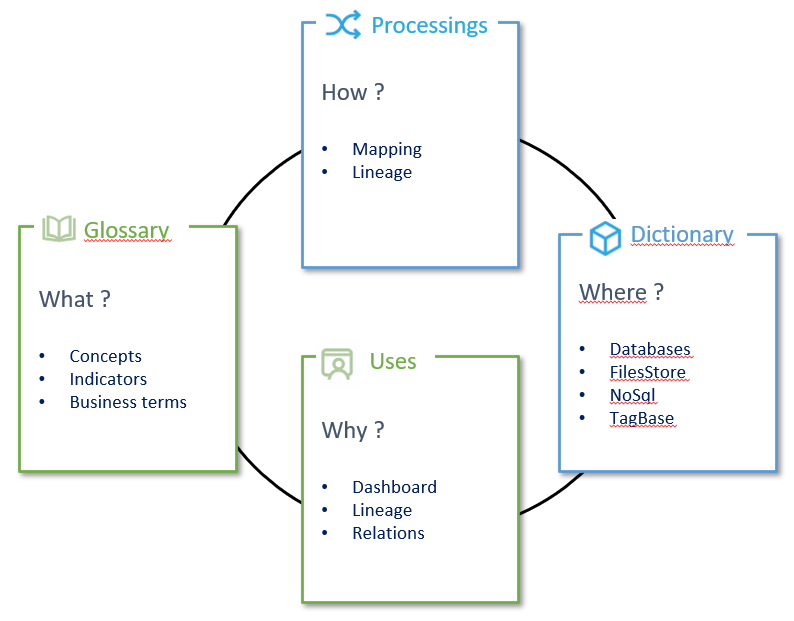
Each workspace is composed of 4 modules that will structure the knowledge on the different aspect of data:
- The glossary is a repository of definitions whose goal is to develop a knowledge base for all users, whether they are IT or Business related. By managing data properties and relations between them, it will help to contextualize.
- The dictionary is a shared visualization of your data sources, whether they are structured or not. The goal is to offer an ergonomic, simple environment to enhance collaboration.
- Data Processing is the module where you will define the data flux between the different data sources of your workspace. By linking input and output data sources through data processing it will help to visualize the links and transformation rules between your data.
- Uses will allow you to map the tool using data, whether they are from a base (mobile application, web ...) or a dashboard. It will explain to users the source of the data used and analyze the impact of a modification.
These 4 modules have different types of objects organized around a meta-model on shelf whose objectives are to answer those questions:
- What are the available data?
- Where are they stored?
- How are they used?
- Why are they used?
The following scheme shows the complementarity between the 4 modules:
The object card
In DataGalaxy, each object type has its own object card composed of specific and common attributes (for every object).