
This article describes how to use an advanced JDBC connection to import metadata into a relational (database) source in the Dictionary module.
The advanced JDBC connection mode is the only connection mode available by default in the connector.
Step 1 : Installation
- Download DataGalaxy connector from the portal (see here)
- Extract the connector archive in the directory of your choice
- In this mode, you must have the JDBC driver you want to use in the connection string (.jar file) and copy it into the /lib directory of the connector
Step 2 : Run connector with a JDBC connection (advanced)
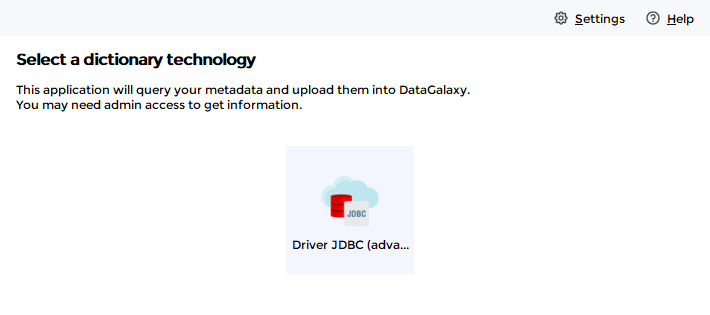
- After starting the connector, access to Dictionary connectors
This mode only allows you to import from relational (database) sources in the Dictionary module
- The login screen is similar to the standard screen, except that it allows you to use custom SQL queries:
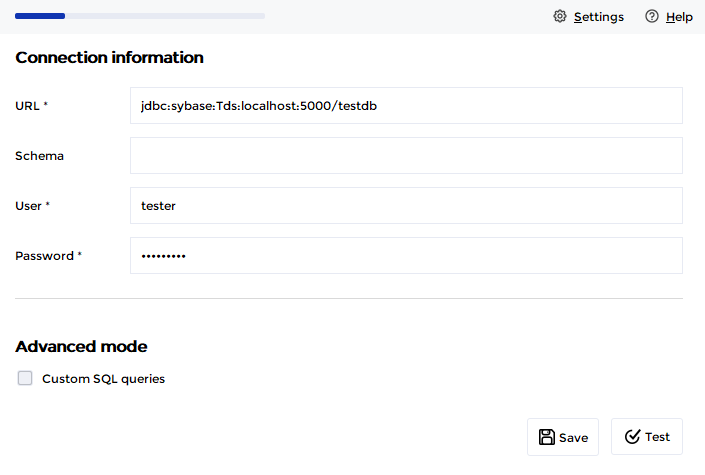
Technical Information
The use cases of this mode are the following (these are potentially complementary):
- You want to connect to a data source for which DataGalaxy does not yet offer a plugin, but for which you have a JDBC driver
- You want to modify the metadata retrieval method by using custom queries
In the 1st case, you just have to declare your JDBC connection string, and the connector will propose you to export the identified metadata.
If you want to use your own queries to extract the metadata, they will have to respect some constraints. Examples of query files are available in the /queries/model folder of the connector.
- The file contains four queries, for tables, columns, primary keys and foreign keys. All four queries are mandatory;
If you don't want to use one of the queries, one option is to set a generic query that returns no results, like select 0 limit 0;
- The \ character is used to split the query on multiple lines;
- The ; character is not needed at the end of a query;
- The comments inside a query are not supported. You can add comments around the query thanks to the # character.
An example of custom queries for use with a Microsoft SQL Server database:
# Query used to generate the 1_Tables file
tables.query=SELECT o.name AS "tablename", \
CASE o.type WHEN 'U' THEN 'Table' ELSE 'View' END AS "tabletype", \
s.name AS "schema", \
d.value AS technicalcomments \
FROM sys.all_objects o \
INNER JOIN sys.schemas s on o.schema_id = s.schema_id \
OUTER APPLY sys.fn_listextendedproperty ('MS_Description', 'schema', s.name, CASE o.type WHEN 'U' THEN 'table' ELSE 'view' END, o.name, null, default) AS d \
WHERE TYPE IN ('V','U')

# Query used to generate the 2_Columns file
# reference: https://stackoverflow.com/a/42258353
columns.query=SELECT objects.name AS "tablename", \
CASE objects.type_desc WHEN 'USER_TABLE' THEN 'Table' ELSE 'View' END AS "tabletype", \
columns.name AS "columnname", \
schemas.name AS "schema", \
COALESCE(CASE \
WHEN baseType.name IN ('varchar', 'char', 'varbinary') THEN baseType.name + CASE WHEN columns.max_length = -1 THEN '(max)' ELSE '(' + CAST(columns.max_length AS VARCHAR(4)) + ')' END \
WHEN baseType.name IN ('nvarchar', 'nchar') THEN baseType.name + CASE WHEN columns.max_length = -1 THEN '(max)' ELSE '(' + CAST(columns.max_length / 2 AS VARCHAR(4)) + ')' END \
WHEN baseType.name IN ('time', 'datetime2', 'datetimeoffset') THEN baseType.name + '(' + CAST(columns.scale AS VARCHAR(4)) + ')' \
WHEN baseType.name IN ('numeric', 'decimal') THEN baseType.name + '(' + CAST(columns.precision AS VARCHAR(4)) + ',' + CAST(columns.scale AS VARCHAR(4)) + ')' \
WHEN baseType.name = 'timestamp' THEN 'rowversion' ELSE baseType.name END, \
CASE \
WHEN columns.is_computed = 1 THEN 'Computed' \
WHEN types.name IN ('varchar', 'char', 'varbinary') THEN types.name + CASE WHEN columns.max_length = -1 THEN '(max)' ELSE '(' + CAST(columns.max_length AS VARCHAR(4)) + ')' END \
WHEN types.name IN ('nvarchar', 'nchar') THEN types.name + CASE WHEN columns.max_length = -1 THEN '(max)' ELSE '(' + CAST(columns.max_length / 2 AS VARCHAR(4)) + ')' END \
WHEN types.name IN ('time', 'datetime2', 'datetimeoffset') THEN types.name + '(' + CAST(columns.scale AS VARCHAR(4)) + ')' \
WHEN types.name IN ('numeric', 'decimal') THEN types.name + '(' + CAST(columns.precision AS VARCHAR(4)) + ',' + CAST(columns.scale AS VARCHAR(4)) + ')' WHEN types.name = 'timestamp' THEN 'rowversion' ELSE types.name END) AS "datatype", \
CASE columns.is_nullable WHEN 0 THEN 1 ELSE 0 END AS "ismandatory", \
d.value AS "technicalcomments", \
columns.column_id AS "order" \
FROM sys.columns \
LEFT JOIN sys.types ON columns.user_type_id = types.user_type_id \
LEFT JOIN sys.types AS baseType ON columns.system_type_id = baseType.system_type_id AND baseType.user_type_id = baseType.system_type_id \
JOIN sys.objects \
JOIN sys.schemas ON schemas.schema_id = objects.schema_id ON objects.object_id = columns.OBJECT_ID \
LEFT OUTER JOIN sys.default_constraints ON default_constraints.parent_object_id = columns.object_id AND default_constraints.parent_column_id = columns.column_id \
LEFT OUTER JOIN sys.check_constraints ON check_constraints.parent_object_id = columns.object_id AND check_constraints.parent_column_id = columns.column_id \
OUTER APPLY sys.fn_listextendedproperty('MS_Description', 'schema', schemas.name, 'table', objects.name, 'column', columns.name) AS d \
WHERE objects.type_desc != 'SYSTEM_TABLE' AND objects.type_desc != 'INTERNAL_TABLE' AND objects.type_desc != 'SQL_TABLE_VALUED_FUNCTION'

# Query used to generate the 3_PK file
tables.primary.keys.query=SELECT tab.name AS "tabletechnicalname", \
schema_name(tab.schema_id) as "schema", \
pk.name AS pktechnicalname, \
col.name AS columnname, \
ic.index_column_id AS pkorder \
FROM sys.tables tab \
INNER JOIN sys.indexes pk ON tab.object_id = pk.object_id AND pk.is_primary_key = 1 \
INNER JOIN sys.index_columns ic ON ic.object_id = pk.object_id AND ic.index_id = pk.index_id \
INNER JOIN sys.columns col ON pk.object_id = col.object_id AND col.column_id = ic.column_id

# Query used to generate the 4_FK file
tables.foreign.keys.query=SELECT schema_name(fk_tab.schema_id) as "fkschema", \
fk_tab.name AS fktablename, \
fk.name AS fktechnicalname, \
fk_col.name AS columnname, \
schema_name(pk_tab.schema_id) AS "pkschema", \
pk_tab.name AS pktabletechnicalname, \
pk.name AS pktechnicalname, \
pk_col.name AS pkcolumnname \
FROM sys.foreign_keys fk \
INNER JOIN sys.tables fk_tab ON fk_tab.object_id = fk.parent_object_id \
INNER JOIN sys.tables pk_tab ON pk_tab.object_id = fk.referenced_object_id \
INNER JOIN sys.indexes pk ON pk_tab.object_id = pk.object_id AND pk.is_primary_key = 1 \
INNER JOIN sys.foreign_key_columns fk_cols ON fk_cols.constraint_object_id = fk.object_id \
INNER JOIN sys.columns fk_col ON fk_col.column_id = fk_cols.parent_column_id AND fk_col.object_id = fk_tab.object_id \
INNER JOIN sys.columns pk_col ON pk_col.column_id = fk_cols.referenced_column_id AND pk_col.object_id = pk_tab.object_id