
This article describes how DataGalaxy Trino connector works.
This connector is available in the following modes:
| Desktop mode ✅ | SaaS Online mode ❌ |
Connector scope
The connector allows you to import the following metadata from Trino into a Database source:
- All Trino catalogs
- The content of the catalogs : schemas, tables/views and columns
The extracted objects and their correspondences are detailed in the following table:
| Trino Object | DataGalaxy Object | DataGalaxy Attributes | Comments |
| Catalog | Modèle (Conteneur) | Technical type | The technical type corresponds to the technology used by the Trino catalog (mysql, hive, ...). |
| Schema | Modèle (Conteneur) | ||
| Table / View | Table / View (Structure) | The comment on the table/view is brought up when it is available. | |
| Column | Column | The name, data type, comment and order are brought up when available. |
Step 1 : Installation
- Download DataGalaxy connector from the portal (see here)
- Extract the connector archive in the directory of your choice
- Download the Trino plug-in from the portal and copy it into the /lib directory of the connector
Step 2 : Run Trino connector
- After starting the connector, access to Dictionary connectors:
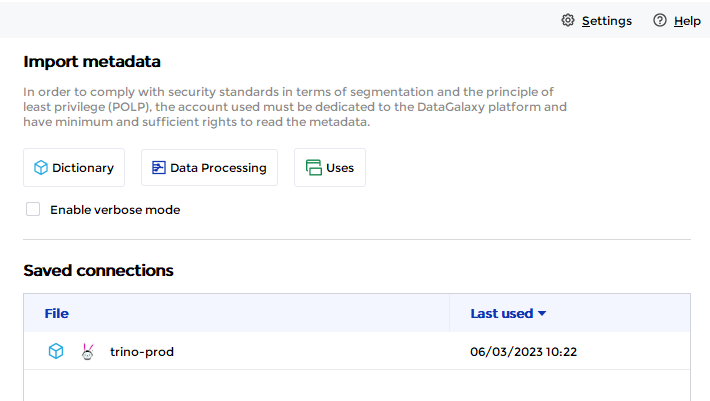
- If it has been correctly installed, the Trino plug-in appears in the list
- The following information is requested:
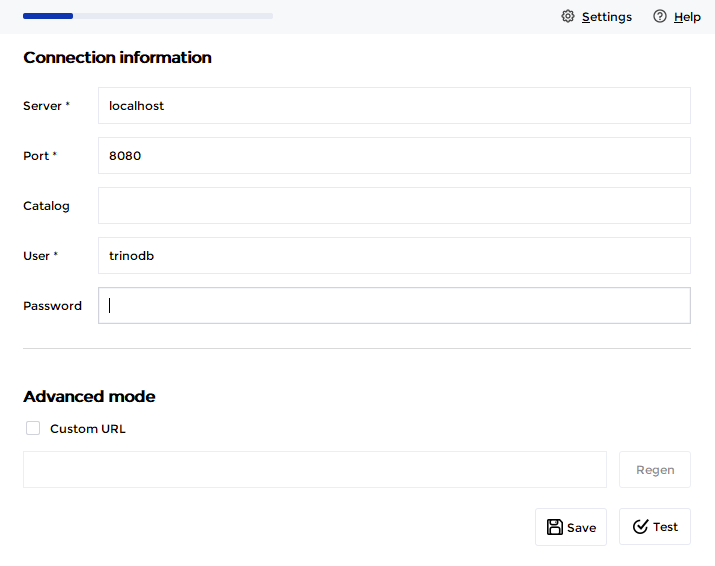
| Parameter | Mandatory | Description |
| Server | Yes | Name or IP address of the Trino instance |
| Port | Yes | Port of Trino instance |
| Catalog | No | Limits the scope of extraction for a given catalog |
| User | Yes | User's name |
| Password | No | User's password |
| Advanced mode | No | Option that allows you to customize the JDBC URL used in the connection ⚠ The JDBC connection string syntax allows you to specify a catalog. However, if your need is to limit the connector's retrieval scope to a given catalog, please use the field above provided for that purpose. |
Technical informations
The connector uses the JDBC driver provided by the Trino editor.
Releases
| Date | Plugin Version | DataGalaxy release | Desktop Connector version (minimum) | Description |
| 06/08/2024 | 2.0.0 | v3.65.0 | 5.0.5 | Migrated from java 11 to java 17 + CVE fixes |