
This article describes how DataGalaxy Starburst connector works.
This connector is available in the following modes:
| Desktop mode ✅ | SaaS Online mode ✅ |
Connector scope
The connector allows you to import the following metadata from Starburst :
- All Starburst catalogs are imported in the Dictionary as of their content: schemas, tables/views and columns ;
- The Domains and Starburst Data Products are imported in the Usages module.
The extracted objects and their correspondences are detailed in the following table:
| Trino Object | DataGalaxy Module | DataGalaxy Object | DataGalaxy Attributes | Comments |
| Catalog | Dictionary | Model (Container) | Technical type | The technical type corresponds to the technology used by the Starburst catalog (mysql, hive, ...). |
| Schema | Dictionary | Model (Container) | ||
| Table / View | Dictionary | Table / View (Structure) | The comment on the table/view is brought up when it is available. | |
| Column | Dictionary | Column | The name, data type, comment and order are brought up when available. | |
| Domain | Usages | Application | Each Domain regroups all its Data Products | |
| Data Product | Usages | Dataset | The Data Product is linked to the Model in the Dictionary that represents the Starburst Catalog associated to the Data Product | |
| Dataset | Usages | Dataset | The Dataset is linked to the View in the Dictionary representing this Dataset, child of the Model associated to the the Data Product it belongs to. |
Step 1 : Installation
- Download DataGalaxy connector from the portal (see here)
- Extract the connector archive in the directory of your choice
- Download the Starburst plug-in from the portal and copy it into the /lib directory of the connector
Step 2 : Run Starburst connector
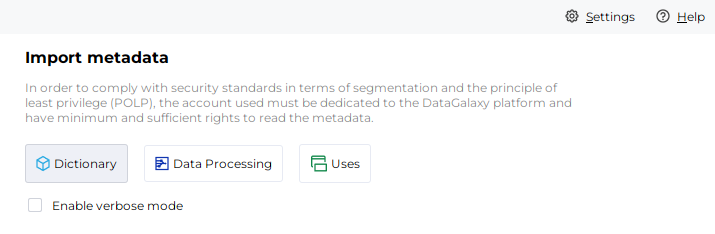
- After starting the connector, access to Dictionary or Uses connectors:
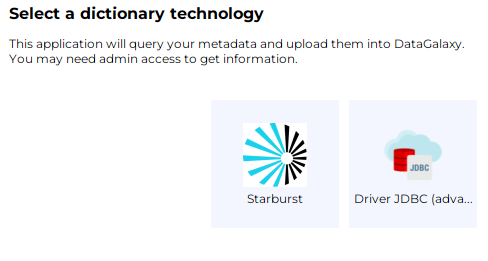
- If it has been correctly installed, the Starburst plug-in appears in the list
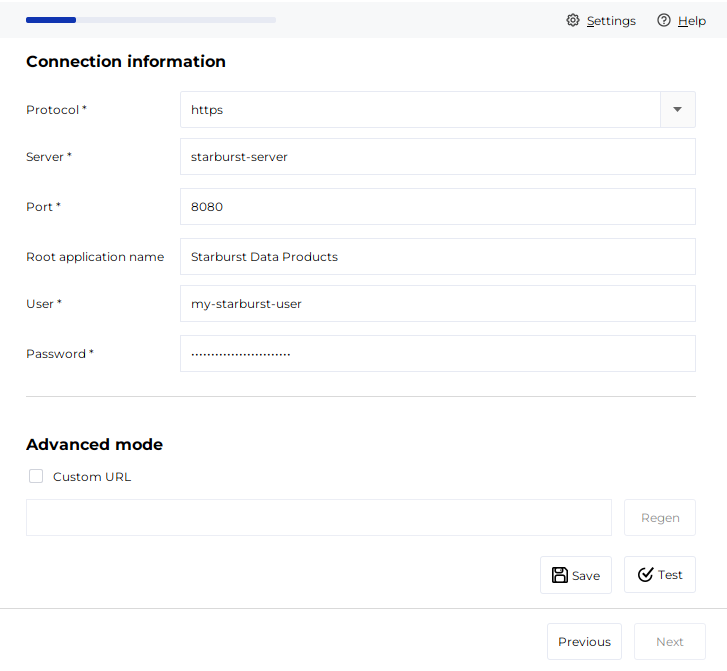
- The following informations are requested:
| Parameter | Mandatory | Description |
| Protocol | Yes | http / https |
| Server | Yes | Name or IP address of the Starburst instance |
| Port | Yes | Port of Starburst instance |
| Root application name | Yes | Name of the "parent" application in the DataGalaxy Usage module, which will be used to store all items of Starburst (Domains, Data Products, Datasets). If the application does not exist, it will be created during the import. |
| User | Yes | User name |
| Password | No | User password |
| Advanced mode | No | Option that allows you to customize the JDBC URL used in the connection ⚠ The JDBC connection string syntax allows you to specify a catalog. However, if your need is to limit the connector's retrieval scope to a given catalog, please use the field above provided for that purpose. |
Technical informations
The connector uses the JDBC driver provided by Starburst and the REST API layer of Starburst Enterprise.
Releases
| Date | Plugin Version | DataGalaxy release | Desktop Connector version (minimum) | Description |
| 07/07/2026 | 2.0.2 | v3.376.0 | 5.18.2 | New internal implementation |
| 23/08/2024 | 2.0.1 | v3.69.0 | 5.2.3 | Updated the logger to show more information when using verbose mode |
| 06/08/2024 | 2.0.0 | v3.65.0 | 5.0.5 | Migrated from java 11 to java 17 + CVE fixes |