
This article explains how the Salesforce connector for DataGalaxy works.
This connector is available in the following modes:
| Desktop mode ✅ | SaaS Online mode ✅ |
Connector scope
The connector allows you to import the following metadata from Salesforce into a Relational source:
Standard objects and custom objects
References between objects
By default, the functional and technical label attributes are populated for the entire scope.
Additional attributes are also filled in depending on the technology and by type of object. To make them appear in DataGalaxy screens, it may be necessary to adapt the screens of the concerned objects. See this article to learn more about screen customization.
The following table details the objects and attributes retrieved, and their correspondences in DataGalaxy :
| Salesforces object | DataGalaxy object | DataGalaxy attributes | Comments |
| Object | Table (structure) | Number of records,Technical type, Description | The current connector allows to import standard objects of functional type and all objects created by users. |
| Field | Column | Description | |
| Object identifier | Primary Key | The object unique identifier technical field is sent to DataGalaxy in order to create primary keys and associated foreign keys | |
| Reference | Foreign Key |
Configuration of a connection
The connector supports two Salesforce authentication flows. Choose one before configuring the connection.
⚠️ Important Security Notice (Deprecation of Username-Password Flow)
Salesforce is sunsetting and blocking the legacy Username-Password flow by default in newer environments to enforce stronger security standards. For details, refer to the official Salesforce Release Notes on Username-Password Flow Blocking.
All users are strongly encouraged to use the Client Credentials Flow to ensure service continuity and robust security.
Option 1: Client Credentials Flow (Recommended & Secure)
This modern authentication flow does not require storing individual user passwords or security tokens in the connector configuration.
To set up this flow, you must perform the following configuration steps in your Salesforce instance:
- Configure a Client Credentials Flow.
Follow the official Salesforce guide: Configure Client Credentials Flow for External Client Apps. - Assign a Run-As User: In the App's Policies, you must assign a Run-As User. Choose a user account with sufficient data access permissions for the objects DataGalaxy needs to scan.
- Configure OAuth Scopes: In the App's OAuth Settings, you must add the Manage user data via APIs (api) OAuth scope to the app. Without it, Salesforce issues a token that cannot access the REST API.
- Note your org's My Domain URL, for example
https://acme.my.salesforce.com. This flow is not served fromhttps://login.salesforce.com.
The following information is required to set up a connection using Client Credentials:
| Parameter | Mandatory | Description |
|---|---|---|
| URL | Yes | Your Salesforce My Domain URL, for example: https://acme.my.salesforce.com |
| Client Id | Yes | The Consumer Key from your External Client App's OAuth settings. |
| Client Secret | Yes | The Consumer Secret from your External Client App's OAuth settings. |
Option 2: Username-Password Flow
For configuring a connection, you first have to enable user-password auth flow in your Salesforce instance, then create a Connected App (which may require to activate the creation of Connected Apps in the External Client Apps settings). This flow will require the user to get a secret token and his user and password, in addition to the client_id (consumer key) and client_secret (consumer secret) provided by the Connected App.
The following information is required to set up a connection:
| Parameter | Mandatory | Description |
| URL | Yes | Salesforce authentication URL, for example: https://login.salesforce.com |
| Client Id | Yes | Identifier and secret of the access key of a "Connected App". The following Salesforce documentation explains how to generate a "Connected APP" in order to get the identifier and the secret: Enable OAuth Settings for API IntegrationThis app must have the following scope of rights for the connector to access the APIs:
|
| Client secret | Yes | |
| Token | Yes | Initial access token identifier associated with the user. The following documentation explains how to generate one to receive it by email: Reset Your Security Token |
| User | Yes | User's Salesforce login email address |
| Password | Yes | User's Salesforce login password |
The connector uses version 54.0 of the Salesforce REST API via a connected app.
Execution of the connector
To create a connection to Salesforce via the Online connector, the entry points are as follows:
From the Import button of the "Shortcuts" widget on the home screen of a client space or workspace
From the Import button of one of the modules when it is empty
From the Import button in the contextual menu of one of the modules, on the right side of the filtered views
From the Add a connection button in the Connector tab available in the workspace setup screen
You can optionally filter (by module, connector type or by using the search bar), then click on the desired technology: 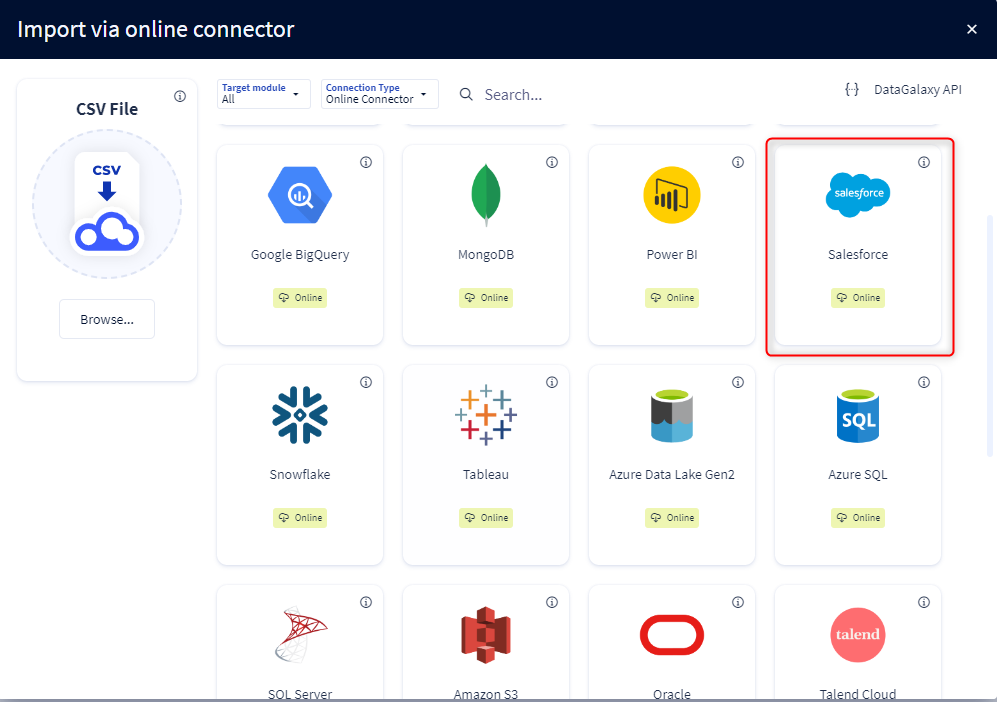
You then need to complete the login form using the login information described above to perform an import. For more details on the steps involved in running the Online connector, you can consult the following article: [HowTo] Running the Online Connector.
This technology is also available via the Desktop Connector, you can find more information on the procedure here: [How to] How to use the connector.
Releases
| Date | Plugin Version | DataGalaxy release | Desktop Connector version (minimum) | Description |
| 27/08/2026 | 5.0.1 | v3.407.0 | 6.1.5 | Added support for new authentication mechanism (credential flow) |
| 12/12/2025 | 3.1.1 | v3.290.4 | 5.15.3 | Added description retrieval for tables and columns |
| 23/08/2024 | 3.0.1 | v3.69.0 | 5.2.3 | Updated the logger to show more information when using verbose mode |
| 30/07/2024 | 3.0.0 | v3.63.0 | 5.0.4 | Migrated from java 11 to java 17 + CVE fixes |