
This article explains how to use the OpenAPI connector for DataGalaxy.
This connector is available in the following modes:
| Desktop mode ✅ | SaaS Online mode ❌ |
Connector Overview
Swagger is a tool for generating documentation for REST APIs based on the OpenAPI specifications. The OpenAPI connector allows to read specification files (.yml, .yaml, .json files) and to import the corresponding object definitions into a NoSQL source. The retrieved objects and their correspondences in DataGalaxy are detailed in the following table:
| OpenAPI Object | DataGalaxy Object | Comments |
| Path (URL de l'API) | Directory | Depending on the representation mode chosen, the URL of the API and the call path of the methods will be decomposed or regrouped to reproduce the structure of the API. |
| (Operation GET/POST/PUT/DELETE/...) | Directory | Each operation described gives rise to the creation of a directory |
| "parameters" | File | |
| Parameters | Fields / SubStructures | The complete tree structure of the object is represented in DataGalaxy, exploiting the notion of sub-structure when necessary. The type of a schema in the source files is mandatory to determine the target type. |
| "responses" | File | |
| (Response code) | SubStructure | Each response code (200, 401, 415, ...) gives rise to the creation of a sub structure |
| (Objets de la réponse) | Fields / SubStructures | The complete tree structure of the response object is represented in DataGalaxy, exploiting the notion of sub-structure when necessary. The type of a schema in the source files is mandatory to determine the target type. |
Step 1 : Installation
- Download DataGalaxy connector from the portal (see here)
- Extract the connector archive in the directory of your choice
- Download the JSON Schema plug-in from the portal and copy it into the /lib directory of the connector
Step 2 : Run JSON Schema connector
- After starting the connector, access the Dictionary connectors:
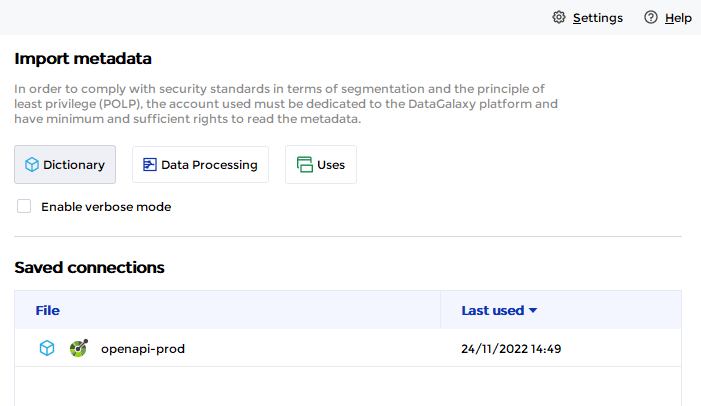
- If it has been correctly installed, the OpenAPI plug-in will appear in the list
- The following information is requested:
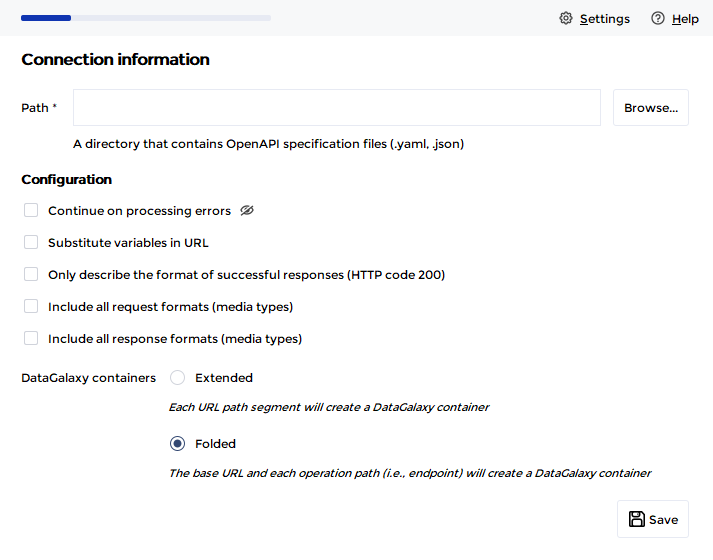
| Parameter | Mandatory | Description |
| Path | Yes | Path to a directory containing Open API specification files (.yml, .yaml, .json) |
| Ignore errors | No | Option to ignore the presence of badly structured or uninterpretable files, in order to continue processing when an error is detected. When unchecked, the presence of an error file blocks the import process (default operation). |
| Substitute variables in URL | No | Option to replace variables in the URL with their default values declared in the files. |
| Describe only the format of successful responses | No | Option to ignore responses with an HTTP code other than 200. |
| Include all formats (media-types) of requests | No | Option to take into account the media-types present in the queries as a substructure |
| Include all formats (media-types) of responses | No | Option to take into account the media-types present in the responses as a sub-structure |
| DataGalaxy container representation mode | Yes | Defines the rule for the representation in DataGalaxy of the URL and endpoint paths of the API.
|
Once these information filled, you can test the connection and start the import.
Technical information
The connector supports versions 2 and 3 of the OpenAPI specification.
Link to Swagger documentation and OpenAPI specification: https://swagger.io/specification/
Releases
Date | Plugin | DataGalaxy | Desktop Connector | Description |
| 05/05/2026 | 7.0.1 | v3.337.0 | 5.15.9 | Array types handled |
16/07/2024 | 7.0.0 | v3.59.0 | 5.0.1 | Migrated from java 11 to java 17 |