
The purpose of this article is to explain how to use the quick filters offered by DataGalaxy.
The quick filters make your search easier and faster by offering you the most likely filters to be of interest, directly in the heart of your search.
Quick Filters are available in a dedicated section in the search bar on the search home page, as well as in the search field at the top right throughout the application. The arrows at the ends of the section allow you to navigate between the quick filters.
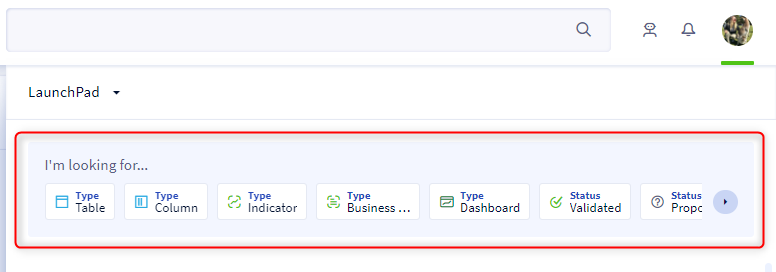
Once you click in this search bar, you will be presented with quick filters based on your license level. Only quick filters that return results are displayed.
You can add as many quick filters as you have available.
There are 2 types of quick filters:
- Resolved quick filters
 These are filters on an attribute (or a link) to which a value is assigned. In this example, the attribute is Type, and the value is Indicator. Once you click on this filter, it is added to the search bar. You can then edit it by clicking on the small filter arrow.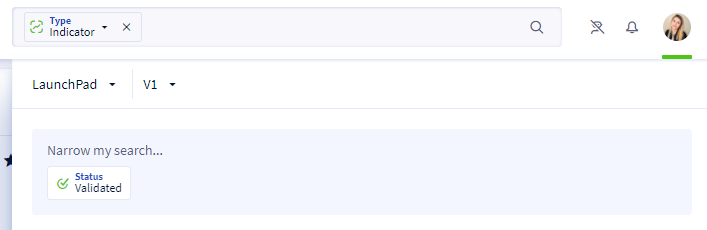
- Unresolved quick filters
 These are filters on an attribute (or link) without an assigned value. In this example, the attribute is Owners, and it is up to you to choose the value(s) of your choice from the drop-down list after selecting this filter.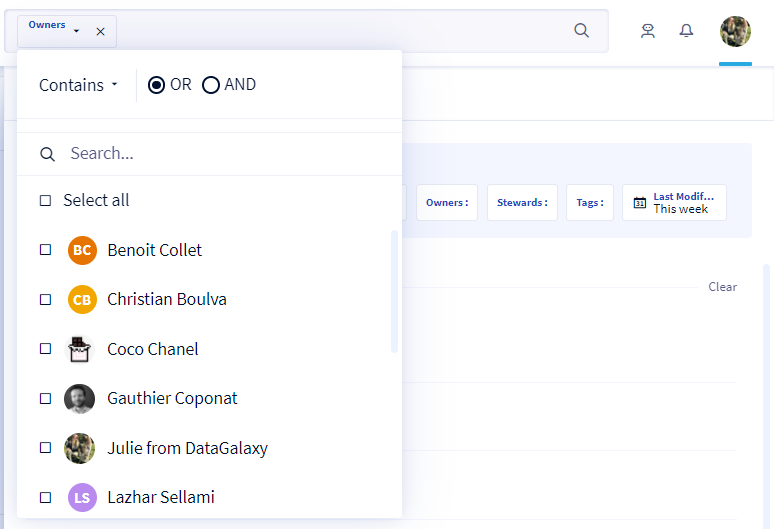
To learn how to set up quick filters, and add quick Filters on your custom attributes, please see this article: [How to] Manage the quick filters.