What is the business lexicon?
Business lexicons let you specify the translation of a specific term or acronym specific to your company in all multilingual languages. Thanks to the business lexicon, as soon as our AI encounters a term or acronym in your data catalog, it uses the translation you've specified in the lexicon to make the translation.
Why is it important to update your business lexicon before starting translations?
The business lexicon is not mandatory when activating the Multilingual AI feature, but it is recommended that you create or update it before launching translations so that our AI takes the lexicon into account in its translations. If you update the business lexicon after translating your data catalog, then our AI will only take your lexicon into account for new translations. Existing translations will not be modified.
How do I create/update the business lexicon?
Customer area administrators can manage the business lexicon. The business lexicon will be requested once the Multilingual AI feature is activated. This step is not mandatory but strongly recommended (see paragraph above).
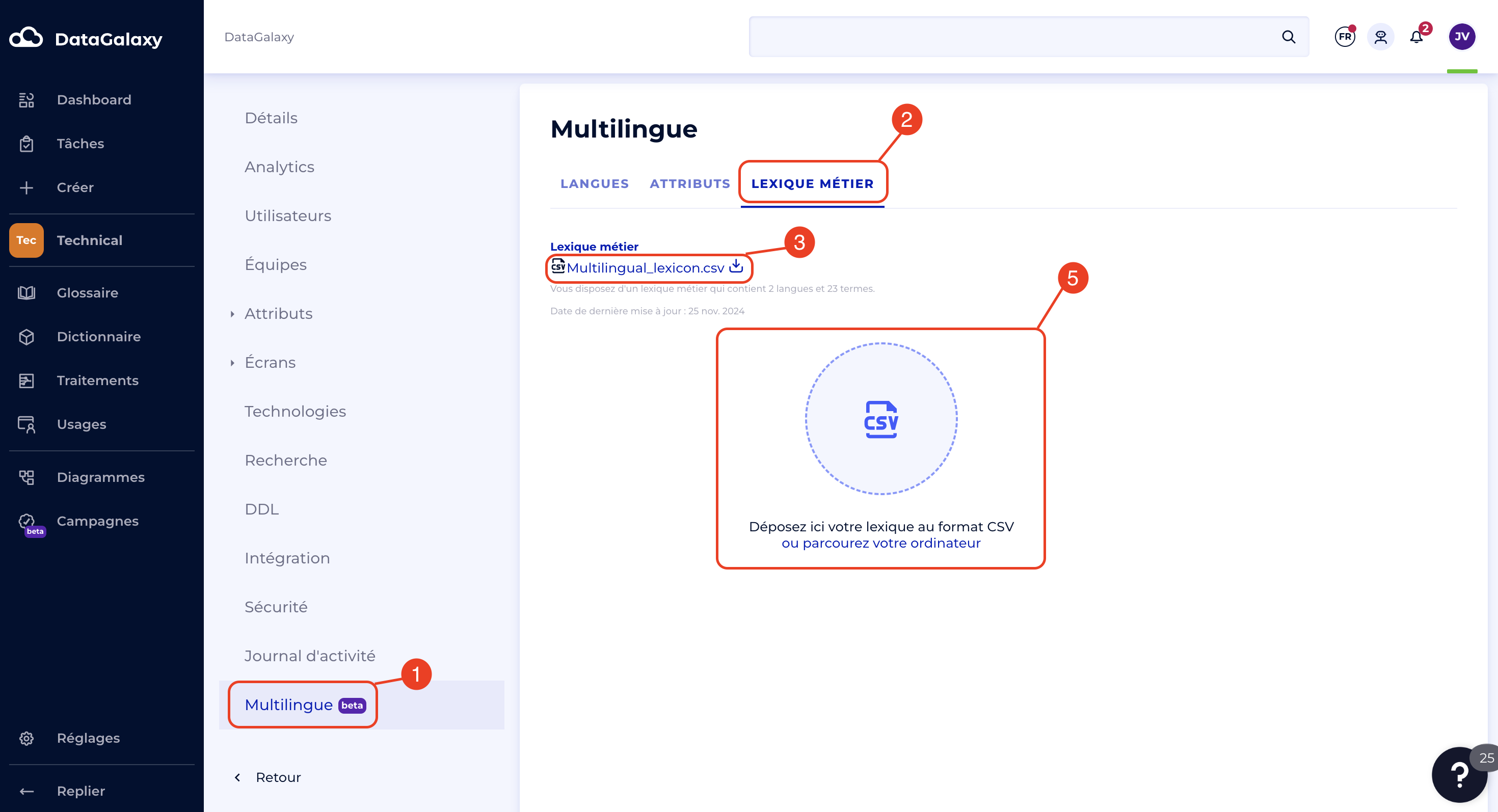
Once the Multilingual AI feature has been activated, you can update the business lexicon at any time. Future translations will reflect the new business lexicon. To add or update your business lexicon, you need to:
- Go to the Multilingual section of the administration system
- Go to the Business Lexicon tab
- If you are importing the lexicon for the first time, download the import template or download the existing lexicon.
- Update your lexicon
- Re-import your file (in CSV format)