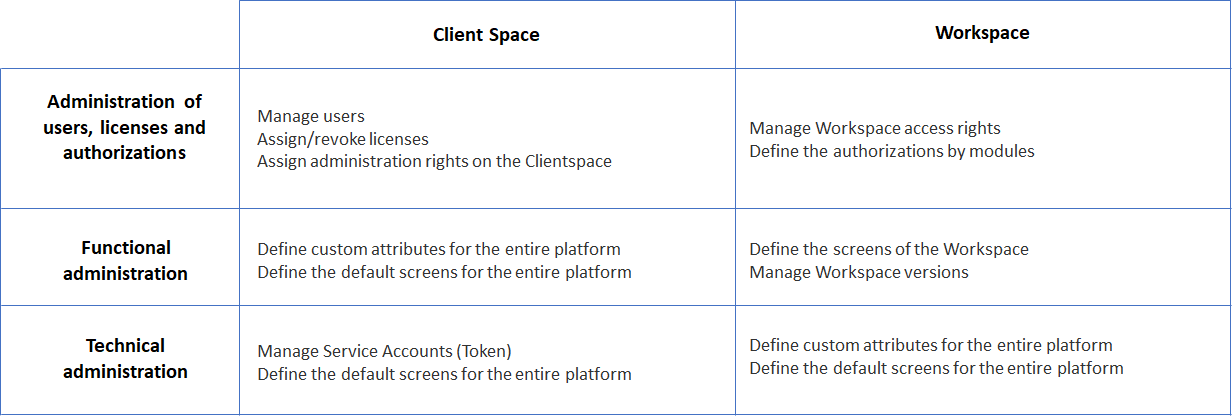
The management of users and their authorizations in DataGalaxy is based on several concepts:
The level of license
The level of the license of a user directly affects authorizations but also the availability of certain functionality in the platform.
What licenses does DataGalaxy offer?
DataGalaxy offers 2 types of licenses allowing several levels of authorizations:
Data Stewards, which allows you to have rights to:
Manage the Client Space,
Manage one or more Workspaces,
Edit and view content in Workspaces,
Interact with other users (tasks and comments).
- Data Reader, which allows you to have rights to:
View content in Workspaces,
Interact with other users (Comments only).
Some article may still refers to the Data Explorer licence type. This legacy type allowed users to have rights to:
- Edit and view content in Workspaces,
- Interact with other users (tasks and comments).
The functioning of management capacities
There are 3 types of administration in DataGalaxy:
Administration of users, licenses, and authorizations:
It concerns the management of users and access rights to the platform by means of the agreement or revocation of licenses and/or authorizations.
Functional administration:
Its role is to allow the organization of data governance through, for example, the definition of the structure of objects (management of personalized attributes and screens, label administration,...).
Technical administration:
It allows you to manage the integration of other platforms with DataGalaxy: communication to other collaborative platforms, creation of service accounts, etc.
These different roles can be managed on 2 levels:
- Client Space,
- Workspace.