
This article describes how to access the administration features of DataGalaxy, both at clientspace and workspace level.
You can access these articles to go deeper :
- Create and delete workspaces
- Manage users at a clientspace level or at the workspace level
- Manage attributes
- Customize screen at a clientspace level or at the workspace level
Administration can be done at:
- The clientspace level: this menu will give you access to features such as user administration, attributes creations, screen, database & person management, integrations features.
- The organization level: It will give you access to the organization's administration features such as consolidation, screens definition & team management.
- The workspace level: it will give you access to workspace specific features such as team management, screens definition, third-party tool integration ...
Access the clientspace administration capacities
To access it, you need to be an administrator. The access is done by clicking on your icone on the top right of your screen, and then select administration. 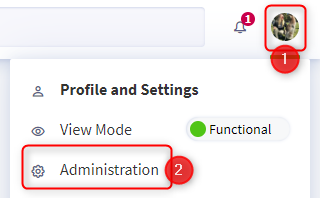
To assign administrator rights to a user, see this article: [How to] Manage users at the clientspace level
Access the workspace administration capacities
Users who have the role of administrator on the workspace have the ability to access administrative capabilities by navigating to that workspace and then clicking on the wheel in the lower left-hand corner of the side navigation bar. 
Once in the workspace, the administrator can access :