The purpose of this article is to introduce you with the concept of the Clientspace administration menu, on what basis to make the settings and how to take advantage of the features.
The following elements are described in detail in additional articles
What is the purpose of the administration of the clientspace?
One of DataGalaxy's ambitions is to provide a consistent view of data across the organization. This vision requires:
- Identify, consolidate and share the common language elements of the organization.
- Be able to define harmonized object characteristics.
- Establish common information bases for objects.
To do this, it is necessary to have a common space allowing the construction and sharing of these elements. However, depending on the maturity and needs, some business areas or IT perimeter will want more information or very specific characteristics.
For example, the finance domain will want to document its indicators very carefully in order to know the calculation formulas, but also the dates and frequency of updates... as many criteria that may be relevant for DATA teams but far from the concerns of marketing teams.
The clientspace will allow you to manage this wide variety of needs. Indeed, as defined in the article "the main concepts of DataGalaxy", the Client Space:
- Is specific to each organization: except for a few default fields that are used to initiate mapping reflection, all attributes are fully editable and categorizable.
- Contains the different workspaces: i.e. spaces in which it is possible to map different business areas.
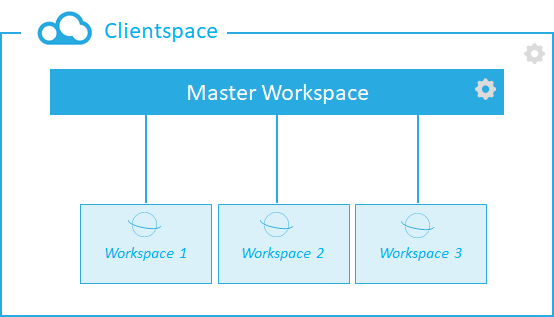
Thus the Clientspace allows to create a common management framework that can be used exhaustively or not by the workspaces:
- Which attributes are common and should, therefore, be present on each workspace?
- Which characteristics should be managed centrally vs. those that can be left to the stewards' hands?
- Should we create default screens to guide the mapping or should each workspace appropriate them?
Other elements allow for further reflection on the use of the platform:
- What database technologies are available? Should they be managed specifically?
- Do tools have to retrieve information from the platform? If so, how can they be integrated?
- Should all the people mentioned need to be users of the solution? If not, how can they be managed effectively?
What are the inheritance rules between Clientspace and the workspace?
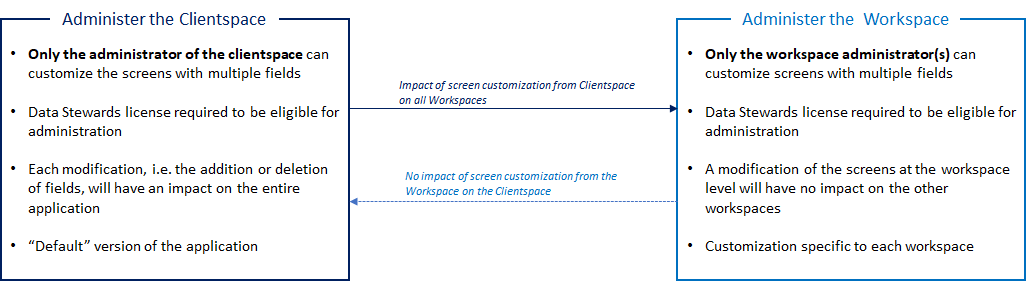
Each custom setting at the Clientspace level will have an impact on all workspaces. This is a "default" version of DataGalaxy.
However, it is also possible to customize the workspace (only with a Data Stewards license). Indeed, the administrator can take control of his workspace to customize it, by adding or deleting fields for example, and thus make it more relevant to his needs. In this case, the different customizations will have no impact on the other workspace.
The diagram below summarizes the main characteristics of clientspace and workspace and the non-reciprocal inheritance relationship: