
This article describes how to use the Google Cloud Storage connector for DataGalaxy.
This connector is available in the following modes:
| Desktop mode ✅ | SaaS Online mode ✅ |
Connector scope
The connector allows you to import objects into a FileStore source from a Google Cloud Storage DataLake.
The extracted objects and their correspondences are detailed in the following table:
| Google Cloud Storage Object | DataGalaxy Object | Comments |
| Directory | Directory (Container) | |
| File | File (Structure) | |
| Field | Field | The definition of the columns is imported if the processed file is a CSV file (separator ";") |
Step 1 : Installation
- Download DataGalaxy connector from the portal (see here)
- Extract the connector archive in the directory of your choice
- Download the Google Cloud Storage plug-in from the portal and copy it into the /lib directory of the connector
Step 2 : Run Google Cloud Storage connector
- After starting the connector, access to Dictionary connectors:
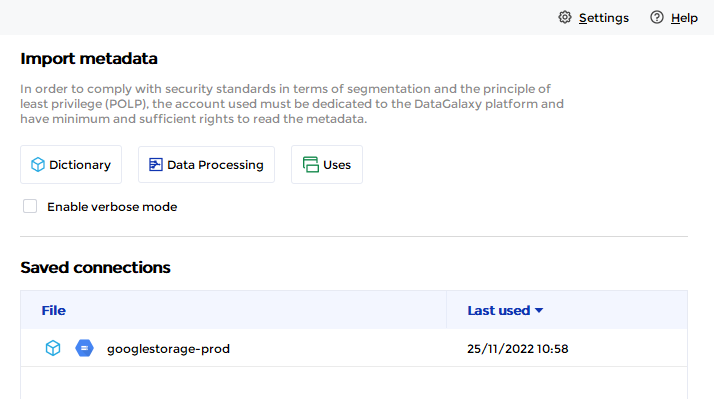
- If it has been correctly installed, Google Cloud Storage plug-in appears in the list
- The following information is requested:
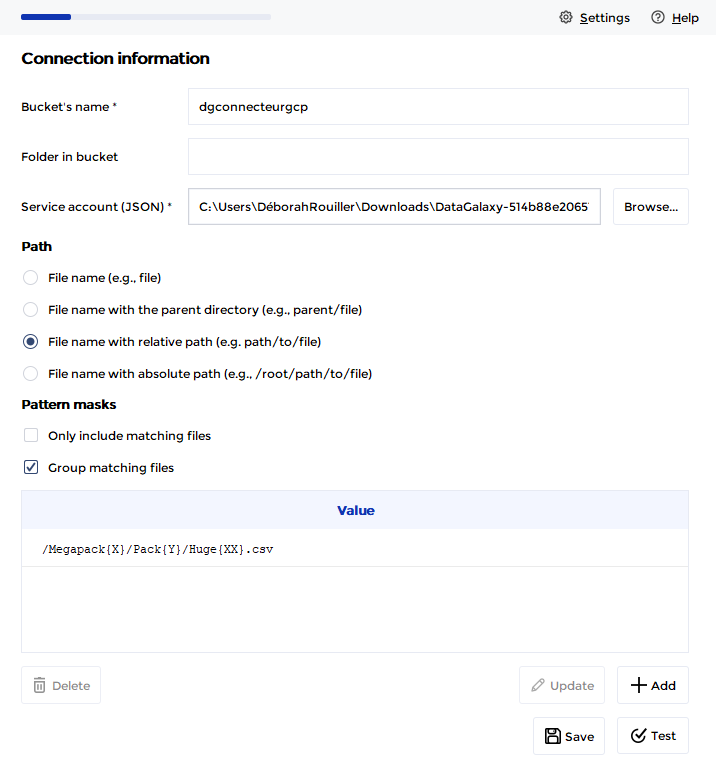
| Parameter | Mandatory | Description |
| Bucket's name | Yes | Bucket Name |
| Folder in bucket | No | |
| Service account (Json) | Yes | |
| Patterns | No | Masks allow you to define strategies for grouping and filtering folders and files according to naming patterns. Example: /datasource/{YYYYMMDD}/file_{YYYYMM}_{zz}.csv Masks must be absolute paths from the root and each character is important, so it may be necessary to define multiple masks to cover all your cases. More information about this setting is available when running the connector. |
Once these information filled, you can test the connection and start the import.
Technical information
Connecting to a Google Cloud Storage resource via the connector requires the creation of a service account first. The "Storage Objects Reader" role will need to be assigned for the resource targeted by the connector.
The Google Cloud Storage connector uses the following REST API: https://cloud.google.com/storage/docs/apis
Releases
| Date | Plugin Version | DataGalaxy release | Desktop connector version (minimum) | Description |
| 03/11/2025 | 4.1.1 | v3.273.1 | 5.0.3 | Passed connector in online mode too |
| 26/07/2024 | 4.0.0 | v3.62.0 | 5.0.3 | Migrated from java 11 to java 17 |