
This article describes how Talend connector for DataGalaxy works.
This connector is available in the following modes:
| Desktop mode ✅ | SaaS Online mode ❌ |
Connector Overview
Talend Connector allows importing the processes of a Talend Open Studio project from the .item and .properties files in the process folder of a workspace.
The extracted objects and their correspondences are detailed in the following table:
| Talend object | DataGalaxy object | Comments |
|---|---|---|
| Project (workspace) | Data Flow | The project (workspace) is imported as a root flow in the Processing module and as a relational source in the Dictionary module to store the unmapped detected tables. |
| Folder | Data Flow | The tree of folders and subfolders is represented using the Data Flow objects. |
| Job | Data Processing | Deleted jobs (in the Recycle bin) are not extracted. |
| Component | Data Processing Item | Links of type "Row" and "Iterate" are used to manipulate data flows: they are aggregated and represented by a processing unit
|
| Input components of a job | Data Processing Input | In order to perform an API import, the Talend connector will import the table and column definitions detected in the components. The connector allows defining the correspondences between the object definitions identified in the Talend flows and the objects present in DataGalaxy using the correspondence rules stored in a mapping file. This file is automatically generated at the time of your first import and can be modified and reused for future imports. |
| Output components of a job | Data Processing Output |
Step 1: Installation
- Download DataGalaxy connector from the portal (see here)
- Extract the connector archive in the directory of your choice
- Download the Talend plug-in from the portal and copy it into the /lib directory of the connector
Step 2: Run the Talend connector
- After starting the connector, access Processing type connectors:
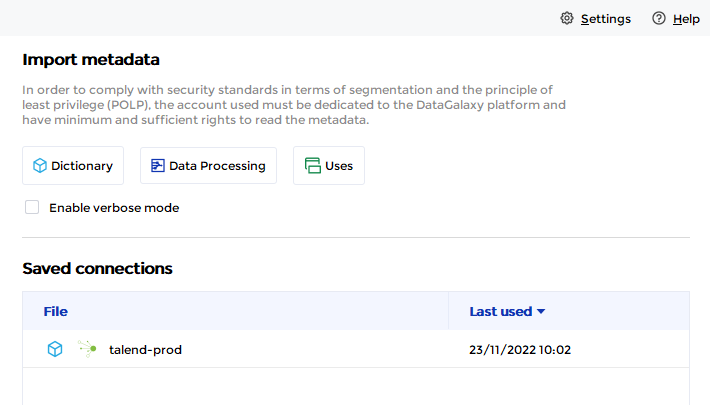
- If it has been correctly installed, the Talend plug-in appears in the list
- The following information is requested:
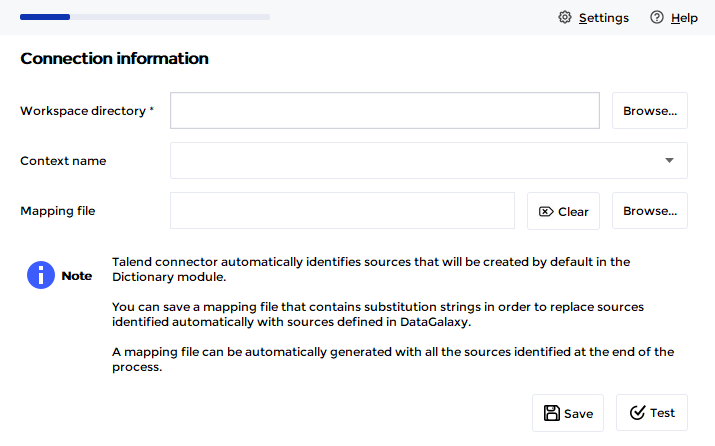
| Parameter | Mandatory | Description |
|---|---|---|
| Workspace directory | Yes | Path to Talend workspace directory |
| Context name | Yes | Allows you to select the context to be applied to the imported processes |
| Mapping file | No | Path to a mapping file: file allowing to define string substitutions for input and output elements of processing items. A mapping file can be generated at the import summary stage during a first import. |
Test button allows you to check that all the files necessary for the import are present in the selected workspace folder.
Technical information
At the summary stage of the import, it is therefore possible to generate a mapping file: 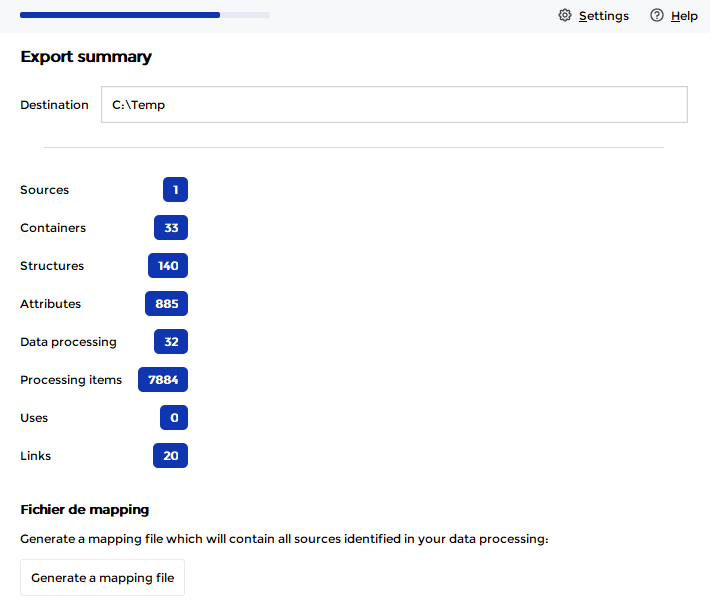
The file will be generated in the /out directory of the connector. It contains all the tables that the connector has detected in the Talend job components. A detection is of the following form:
1.beginsWith=\\REPORTING_INTERNE@talend\\REPORTING_INTERNE\\dbo\\deal_company\\
1.replace.path=\\REPORTING_INTERNE@talend\\REPORTING_INTERNE\\dbo\\deal_company
1.replace.type=\\Relational\\Model\\Model\\Table
If the information associated with the tables could not be extracted from the Talend component, the process IDs of the Talend job will be used to create a Model\Table tree in DataGalaxy.
- The beginsWith attribute corresponds to the path detected by the connector and will allow a replacement to be made, so it must not be modified for the substitution to work.
- The replace.path and replace.type attributes allow you to map to an existing Dictionary table. So you can modify this part to make the link with the Dictionary objects already existing in DataGalaxy. It is also possible to ignore a mapping that allows you not to create a table by default. To do this, you have to set the two attributes to empty (see example below).
The type must be provided in English for the mapping to work.
Example
In this paragraph, we will detail an example to illustrate the use of the mapping file.
We have the job hubspot_owners in our workspace "REPORTING_INTERNE" :
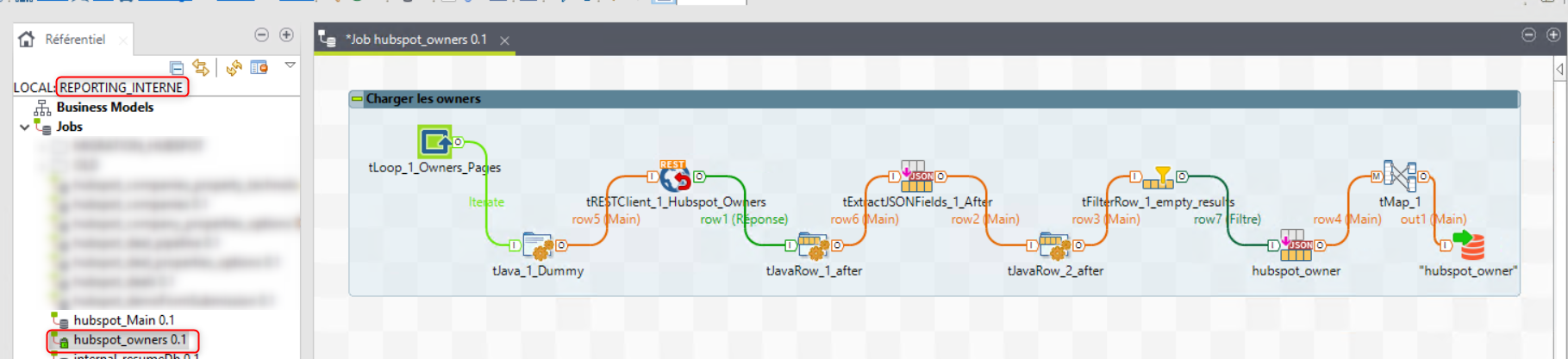
This job loads the "husbspot_owner" table in the REPORTING_INTERNE database from a Hubspot API call.
After a first run of the Talend connector by generating a mapping file, we get the following mapping:
1.beginsWith=\\REPORTING_INTERNE@talend\\REPORTING_INTERNE\\dbo\\hubspot_owner\\
1.replace.path=\\REPORTING_INTERNE@talend\\REPORTING_INTERNE\\dbo\\hubspot_owner
1.replace.type=\\Relational\\Model\\Model\\Table
2.beginsWith=\\REPORTING_INTERNE@talend\\default@talend\\hubspot_owners\\tExtractJSONFields_1\\
2.replace.path=\\REPORTING_INTERNE@talend\\default@talend\\hubspot_owners\\tExtractJSONFields_1
2.replace.type=\\Relational\\Model\\Model\\Table
3.beginsWith=\\REPORTING_INTERNE@talend\\default@talend\\hubspot_owners\\tExtractJSONFields_3\\
3.replace.path=\\REPORTING_INTERNE@talend\\default@talend\\hubspot_owners\\tExtractJSONFields_3
3.replace.type=\\Relational\\Model\\Model\\Table
4.beginsWith=\\REPORTING_INTERNE@talend\\default@talend\\hubspot_owners\\tFilterRow_1\\
4.replace.path=\\REPORTING_INTERNE@talend\\default@talend\\hubspot_owners\\tFilterRow_1
4.replace.type=\\Relational\\Model\\Model\\Table
5.beginsWith=\\REPORTING_INTERNE@talend\\default@talend\\hubspot_owners\\tJavaRow_1\\
5.replace.path=\\REPORTING_INTERNE@talend\\default@talend\\hubspot_owners\\tJavaRow_1
5.replace.type=\\Relational\\Model\\Model\\Table
6.beginsWith=\\REPORTING_INTERNE@talend\\default@talend\\hubspot_owners\\tJavaRow_2\\
6.replace.path=\\REPORTING_INTERNE@talend\\default@talend\\hubspot_owners\\tJavaRow_2
6.replace.type=\\Relational\\Model\\Model\\Table
7.beginsWith=\\REPORTING_INTERNE@talend\\default@talend\\hubspot_owners\\tJava_1\\
7.replace.path=\\REPORTING_INTERNE@talend\\default@talend\\hubspot_owners\\tJava_1
7.replace.type=\\Relational\\Model\\Model\\Table
8.beginsWith=\\REPORTING_INTERNE@talend\\default@talend\\hubspot_owners\\tRESTClient_1\\
8.replace.path=\\REPORTING_INTERNE@talend\\default@talend\\hubspot_owners\\tRESTClient_1
8.replace.type=\\Relational\\Model\\Model\\Table
Following the import, in the DataGalaxy platform, a source has been created in the Dictionary module in order to have the lineage automatically:
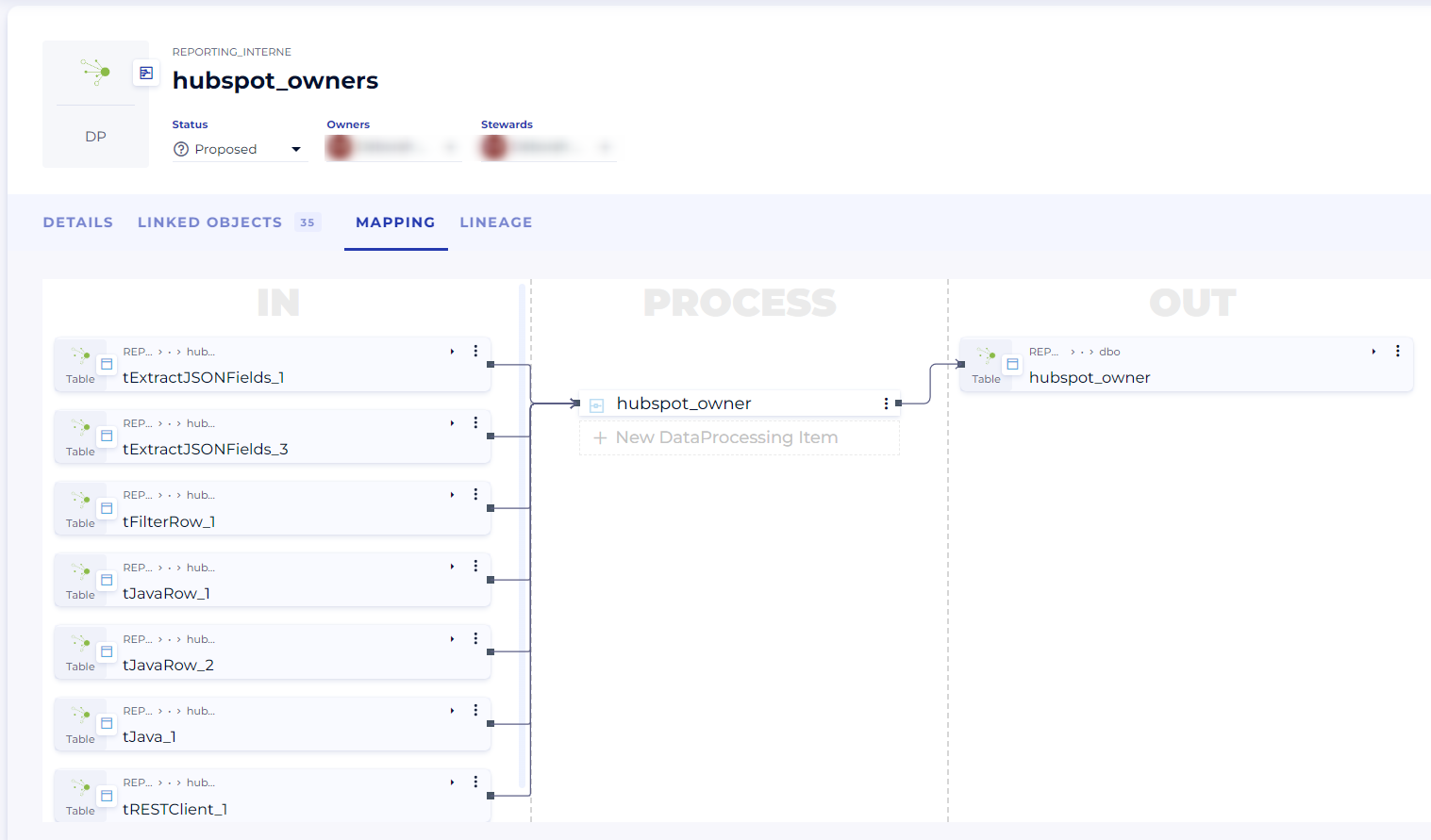
All the tables created are those detected by the connector and listed in the mapping file.
In addition, the flow is described in the processing unit :
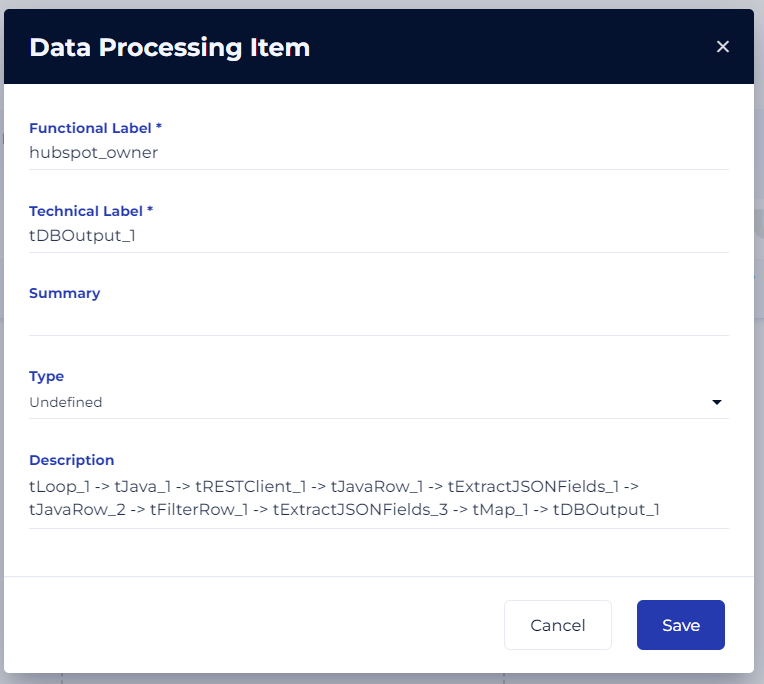 In our case, we already have an existing REPORTING_INTERNE relational source in the Dictionary module, so we want to map our job to it. We also have the API route definitions from the Hubspot tool in a NoSQL source: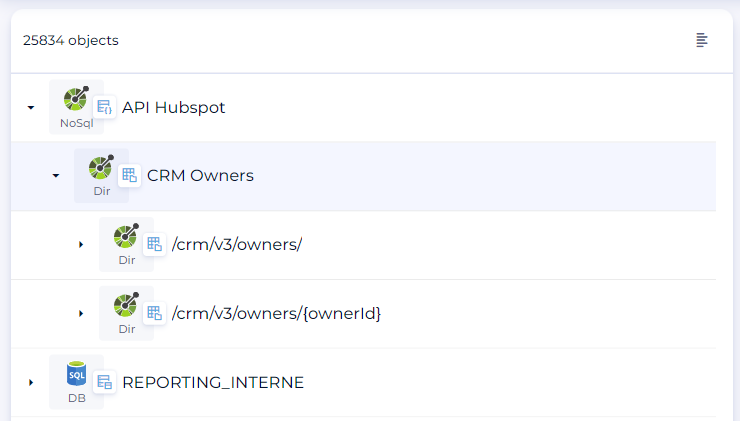
We make the following changes to the mapping file:
- Mapping the hubspot_owner source table from the REPORTING_INTERNE source
- Mapping of the API response /crm/v3/owners/ from the Hubspot API source
- Ignore the other tables of the technical steps of the Talend job
#Thu Oct 20 10:45:41 CEST 2022
1.beginsWith=\\REPORTING_INTERNE@talend\\REPORTING_INTERNE\\dbo\\hubspot_owner\\
1.replace.path=\\REPORTING_INTERNE\\dbo\\hubspot_owner
1.replace.type=\\Relational\\Model\\Table
2.beginsWith=\\REPORTING_INTERNE@talend\\default@talend\\hubspot_owners\\tExtractJSONFields_1\\
2.replace.path=
2.replace.type=
3.beginsWith=\\REPORTING_INTERNE@talend\\default@talend\\hubspot_owners\\tExtractJSONFields_3\\
3.replace.path=\\API Hubspot\\CRM Owners\\/crm/v3/owners/\\get\\responses\\200\\results
3.replace.type=\\NoSql\\Directory\\Directory\\Directory\\File\\SubStructure\\SubStructure
4.beginsWith=\\REPORTING_INTERNE@talend\\default@talend\\hubspot_owners\\tFilterRow_1\\
4.replace.path=
4.replace.type=
5.beginsWith=\\REPORTING_INTERNE@talend\\default@talend\\hubspot_owners\\tJavaRow_1\\
5.replace.path=
5.replace.type=
6.beginsWith=\\REPORTING_INTERNE@talend\\default@talend\\hubspot_owners\\tJavaRow_2\\
6.replace.path=
6.replace.type=
7.beginsWith=\\REPORTING_INTERNE@talend\\default@talend\\hubspot_owners\\tJava_1\\
7.replace.path=
7.replace.type=
8.beginsWith=\\REPORTING_INTERNE@talend\\default@talend\\hubspot_owners\\tRESTClient_1\\
8.replace.path=
8.replace.type=
Nous sauvegardons le fichier pour le mettre dans notre connexion Talend et nous relançons le connecteur pour mettre à jour les liens. Après import, nous obtenons bien les liens attendus :
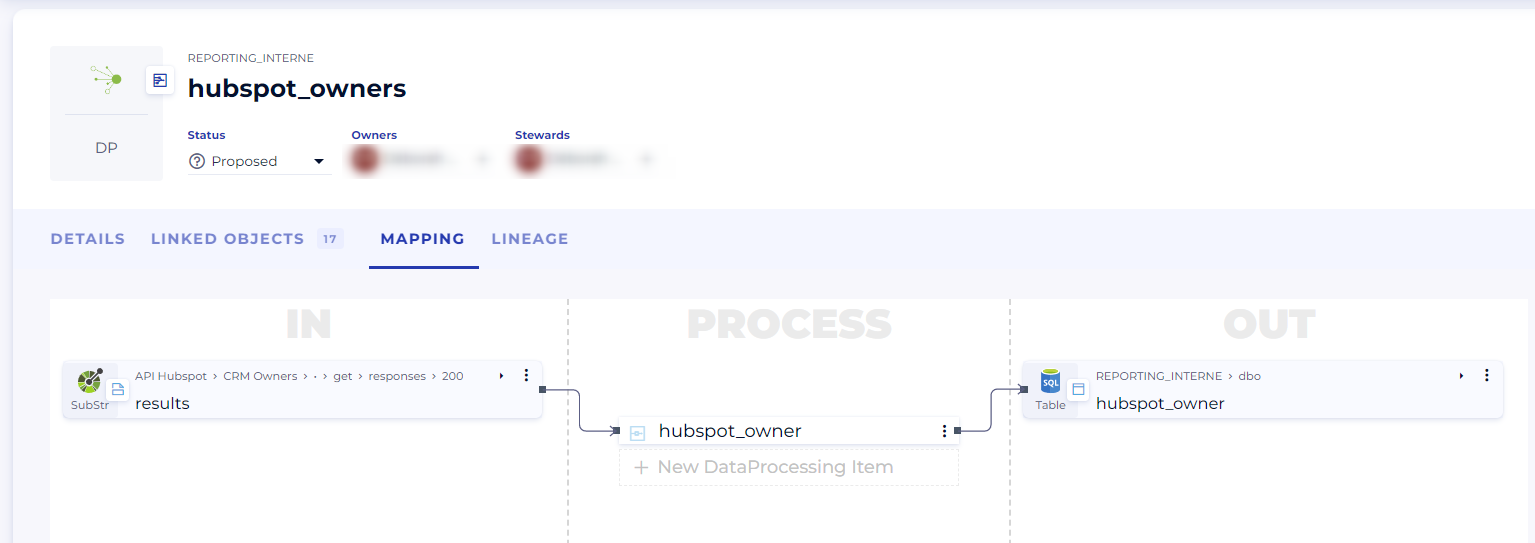
Releases
| Date | Plugin Version | DataGalaxy release | Desktop Connector version (minimum) | Description |
| 23/08/2024 | 3.0.1 | v3.69.0 | 5.2.3 | Updated the logger to show more information when using verbose mode |
| 06/08/2024 | 3.0.0 | v3.65.0 | 5.0.5 | Migrated from java 11 to java 17 + CVE fixes |