
This article describes how Informatica connector for DataGalaxy works.
This connector is available in the following modes:
| Desktop mode ✅ | SaaS Online mode ❌ |
Connector Overview
Informatica connector allows you to import mapping definitions stored in the Informatica repository database. The extracted objects and their correspondences are detailed in the following table:
The queries provided by the connector allow you to extract data from an Informatica repository stored on an Oracle database. If your repository is on a different database engine, the queries will have to be adapted for your database.
| Informatica object | DataGalaxy object | Comments |
|---|---|---|
| Folder | Data Flow | The tree of folders and subfolders is represented using the Data Flow objects |
| Mapping | Data Processing | |
| Tables and columns in processing input | Data Processing Input | |
| Tables and columns in processing output | Data Processing Output |
Step 1: Installation
- Download DataGalaxy connector from the portal (see here)
- Extract the connector archive in the directory of your choice
- Download the Informatica plug-in from the portal and copy it into the /lib directory of the connector
Step 2: Run the Informatica connector
- After starting the connector, access Processing type connectors:
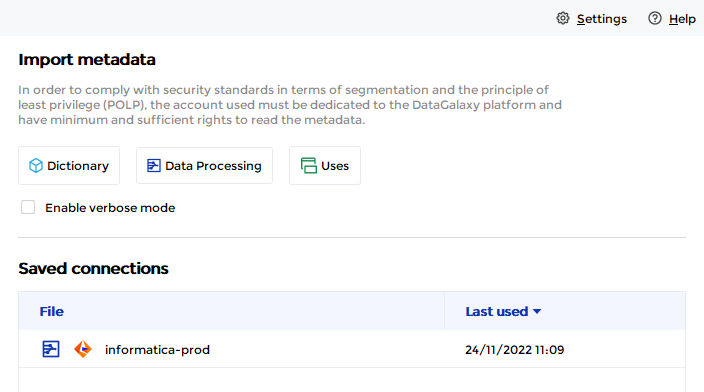
- If it has been correctly installed, the Informatica plug-in appears in the list
- The following information is requested:
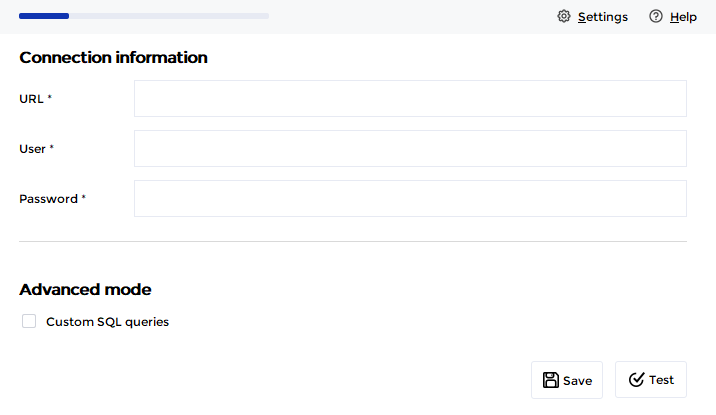
The connection is done using a JDBC driver that must be installed first ( it is also possible to use a JDBC driver embedded in a plugin if necessary).
For this type of plugin, the JDBC driver must first be copied into the /lib directory of the connector to be used in a connection chain
| Parameter | Mandatory | Description |
|---|---|---|
| URL | Yes | JDBC URL to connect to the Informatica repository database |
| User | Yes | |
| Password | Yes | |
| Advander mode | No | Option that allows the use of custom SQL queries (for more information here). Examples of query files are available in the /queries/processing folder of the connector. |
You can then select the mappings you wish to import.
Releases
| Date | Plugin Version | DataGalaxy release | Desktop Connector version (minimum) | Description |
| 07/07/2026 | 3.0.1 | v3.376.0 | 5.18.2 | New internal implementation |
| 06/08/2024 | 3.0.0 | v3.65.0 | 5.0.5 | Migrated from java 11 to java 17 + CVE fixes |