
This article details how the SAP connector for DataGalaxy works.
The SAP connector for DataGalaxy is a Premium connector, which requires to buy an option in your offer. Please reach out to your Account Manager if you're interested in this connector.
This connector is available in the following modes:
| Desktop mode ✅ | SaaS Online mode ❌ |
This connector supports the following import modes:
| Standard mode ❌ | URN mode ✅ |
Description
The DataGalaxy SAP connector can document in DataGalaxy the systems of SAP landscape, ERP or Datawarehouse. As of today (Sept 2025), ECC6 and BW/4HANA are supported.
The connector works in common with Silwood Safyr for SAP, product under license for which DataGalaxy is a reseller, and which can extract metadata from SAP systems in a pivot json format. The files extracted by Safyr can then be processed by the DataGalaxy connector to push the metadata to the platform.
The documentation of Safyr is available on the website of the editor Silwood.
Scope
The scope and the types of objects are depending on the type of SAP system from which you want to retrieve the metadata.
The connector can retrieve SAP structures and their associated schema, and the lineage between certain types of objects, especially for BW/4HANA.
Objects, attributes and mapping into DataGalaxy
SAP System
A SAP system is represented by a Relational database.
The URN follows this syntax:
urn:sap-1:systemId.clientId
The attributes are the following ones:
| DataGalaxy attribute | Source/Value |
|---|---|
| Technical name | systemId/clientId |
| Functional name | systemId/clientId |
Application component
An Application component is represented by a Model.
The URN follows this syntax:
urn:sap-1:systemId.clientId:displayName@sapapplcomp
The attributes are the following ones:
| DataGalaxy attribute | Source/Value |
|---|---|
| Technical name | Display name |
| Functional name | Logical name |
| Technical type | "Application Component" |
Package
A Package is represented by a Model.
The URN follows this syntax:
urn:sap-1:systemId.clientId:displayName@sappackage
The attributes are the following ones:
| DataGalaxy attribute | Source/Value |
|---|---|
| Technical name | Display name |
| Functional name | Logical name |
| Technical type | "Package" |
Table
A Table is represented by a Table.
The URN follows this syntax:
urn:sap-1:systemId.clientId:tableDisplayName
The attributes are the following ones:
| DataGalaxy attribute | Source/Value |
|---|---|
| Technical name | Display name |
| Functional name | Logical name |
| Summary | Long description |
| Technical type | Table type |
| Number of records | Row count |
| Last modification date (of source object) | MetaDataChanged |
View
A View is represented by a View.
The URN follows this syntax:
urn:sap-1:systemId.clientId:viewDisplayName@sapview
The attributes are the following ones:
| DataGalaxy attribute | Source/Value |
|---|---|
| Technical name | Display name |
| Functional name | Logical name |
| Summary | Long description |
| Technical type | Table type |
| Number of records | Row count |
| Last modification date of source object | MetaDataChanged |
Column, BW structure field
A Column or a BW structure field are represented by a Column.
The URN follows this syntax:
urn:sap-1:systemId.clientId:structureDisplayName@structureType:columnDisplayName
The attributes are the following ones:
| DataGalaxy attribute | Source/Value |
|---|---|
| Technical name | Display name |
| Functional name | Logical name |
| Summary | Long description |
| Order | Column position |
| Order in Primary Key | Column position |
| Data type | LogicalDataType |
| Size | Size |
| Technical type | Data element |
| Is mandatory | Opposite of isNullable |
Primary key
A primary key constraint on a Column of a Table is represented by a Primary key.
The URN follows this syntax:
urn:sap-1:systemId.clientId:tableDisplayName:columnDisplayName@primaryKey
The attributes are the following ones:
| DataGalaxy attribute | Source/Value |
|---|---|
| Technical name | Display name (Table) |
BW InfoArea
A BW InfoArea is represented by a Model.
The URN follows this syntax:
urn:sap-1:systemId.clientId:displayName@sapbwinfoarea
The attributes are the following ones:
| DataGalaxy attribute | Source/Value |
|---|---|
| Technical name | Display name |
| Functional name | Logical name |
| Technical type | "InfoArea" |
BW ADSO, HANA Composite Provider, InfoSource, OpenHub Destination, Aggregation Level
A ADSO, HANA Composite Provider, InfoSource, OpenHub Destination, Aggregation Level are represented by a Table.
The URN follows this syntax:
urn:sap-1:systemId.clientId:displayName@sapbwadso
urn:sap-1:systemId.clientId:displayName@sapbwhcpr
urn:sap-1:systemId.clientId:displayName@sapbwisource
urn:sap-1:systemId.clientId:displayName@sapbwohub
urn:sap-1:systemId.clientId:displayName@sapbwaggrlv
urn:sap-1:systemId.clientId:displayName@sapbwopenodsv
The attributes are the following ones:
| DataGalaxy attribute | Source/Value |
|---|---|
| Technical name | Display name |
| Functional name | Logical name |
| Technical type | "ADSO" ou "HANA Composite Provider" ou "InfoSource" ou "OpenHub Destination" ou Aggregation Level |
| Number of records | Row count |
| Last modification date (of source object) | MetaDataChanged |
BW Open ODS View
A Open ODS View is represented by a View.
The URN follows this syntax:
urn:sap-1:systemId.clientId:displayName@sapbwopenodsv
The attributes are the following ones:
| DataGalaxy attribute | Source/Value |
|---|---|
| Technical name | Display name |
| Functional name | Logical name |
| Technical type | "Open ODS View" |
| Number of records | Row count |
| Last modification date (of source object) | MetaDataChanged |
Links (parents, lineage)
The following links are created between objects:
Parents links
| Source objects | Parents objects |
|---|---|
| Application Component, Package | SAP system, Application Component, Package |
| Table, View | SAP system , Application Component, Package |
| Column | Table, View |
| InfoArea | SAP system , InfoArea |
| ADSO, HANA Composite Provider, InfoSource, OpenHub Destination, Aggregation Level, Open ODS View | SAP system , InfoArea |
| BW structure field | ADSO, HANA Composite Provider, InfoSource, OpenHub Destination, Aggregation Level, Open ODS View |
Lineage links (Uses) between Dictionary objects
| Source objects | Linked objects |
|---|---|
| Table, View | View |
| Column | Column |
| ADSO, HANA Composite Provider, InfoSource, OpenHub Destination, Aggregation Level, Open ODS View | ADSO, HANA Composite Provider, InfoSource, OpenHub Destination, Aggregation Level, Open ODS View |
Connection configuration
The following information is required to configure a connection:
| Parameter | Mandatory | Description | Example |
|---|---|---|---|
| System ID | Yes | Three characters system ID which will be used to create the URN of the objects. | PW4 |
| Client ID | Yes | Three digits client ID which will be used to create the URN of the objects. | 050 |
| Path to data folder | Yes | Local folder containing the .json files created by Safyr. | C:\SafyrPW4 |
| Structures to retrieve | Oui (at least one) | Select the type of objects you want to retrieve in DataGalaxy. The text fields aside each object type can be used to add a regular expression to filter on the names of the objects to retrieve. |
Running the connector
Step 1 : Installation
- Proceed to the installation of Silwood Safyr as described in the editor's documentation
- Download the DataGalaxy Desktop connector from the platform
- Extract the Desktop connector's archive in the directory of your choice
- Add both .jar files (domain and plugin) in the lib/ folder of the Desktop connector
Step 2 : Running the connector
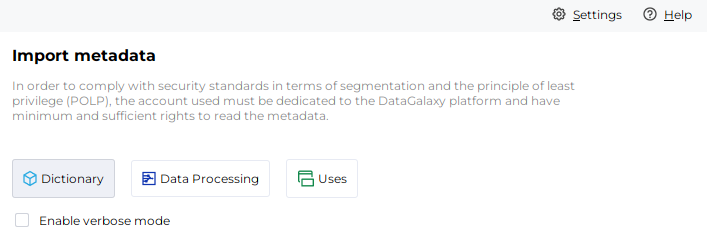
- After launching the connector, access the connectors of the Dictionary category
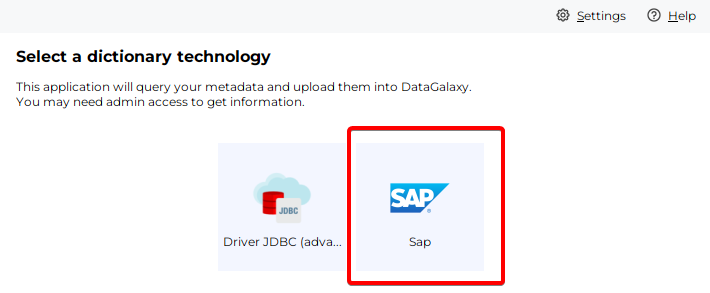
- If it was correctly installed, the Snowflake plug-in will appear
- Fill the corresponding fields using the connection information from above
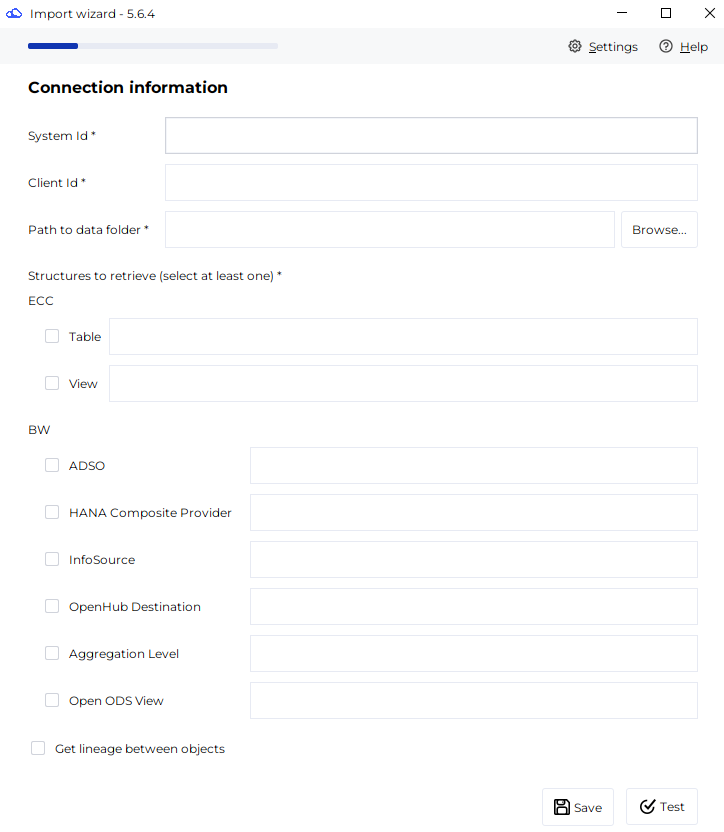
- Click on "Test" to test the connection
- Once the connection test passed follow the steps to finalize your import
Releases
| Date | Plugin Version | Domain Version | Desktop Connector version (minimum) | Description |
| 01/08/2025 | 1.3.1 | N/A | 5.6.4 | Initial production release |