
This article describes how Amazon Redshift connector works.
This connector is available in the following modes:
| Desktop mode ✅ | SaaS Online mode ✅ |
Connector scope
The connector allows you to import the following metadata from AWS Redshift into a Database source.
Additional attributes are also filled in depending on the technology and by type of object. To make them appear in DataGalaxy screens, it may be necessary to adapt the screens of the concerned objects. See this article to learn more about screen customization.
The following table details the objects and attributes retrieved, and their correspondences in DataGalaxy:
Amazon Redshift Object | DataGalaxy Object | DataGalaxy Attributes |
| Schema | Model (Container) | |
| Table / View | Table / View (Structure) | Technical type (to identify external tables) |
| Column | Column |
Step 1 : Installation
- Download DataGalaxy connector from the portal (see here)
- Extract the connector archive in the directory of your choice
- Download the Amazon Redshift plug-in from the portal and copy it into the /lib directory of the connector
Step 2 : Run Amazon Redshift connector
- After starting the connector, access to Dictionary connectors:
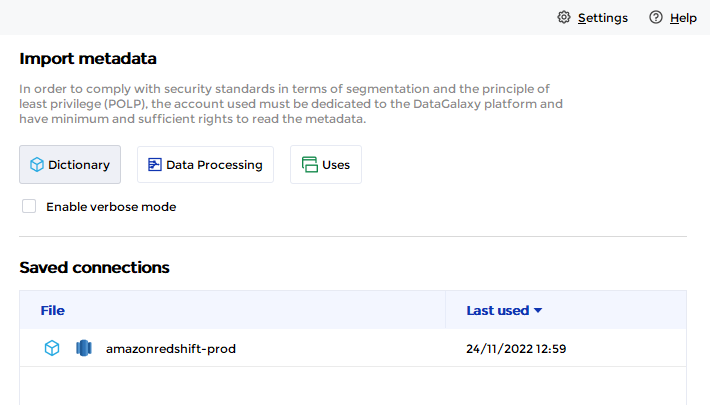
- If it has been correctly installed, the Amazon Redshift plug-in appears in the list
- The following information is requested:
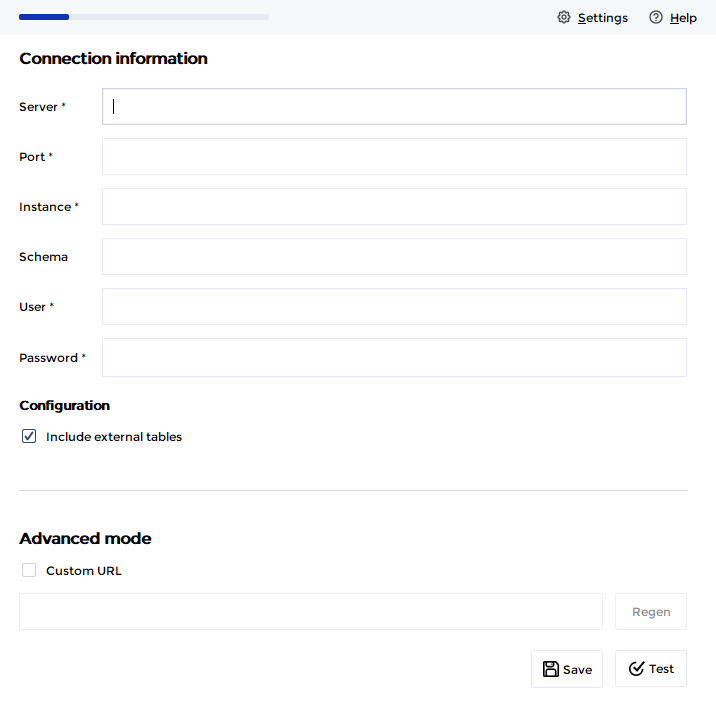
| Parameter | Mandatory | Description |
| Server | Yes | Amazon Redshift server name |
| Port | Yes | Amazon Redshift server port |
| Schema | No | Limits the scope to the specified schema |
| Instance | No | Amazon Redshift instance name |
| User | Yes | |
| Password | Yes | |
| Include external tables | No | Option to extract or not the external tables |
| Advanced mode | No | Option to customize the JDBC URL used during the connection |
Technical information
The Amazon Redshift connector uses the JDBC driver provided by the editor in version 1.2 (https://docs.aws.amazon.com/redshift/latest/mgmt/configure-jdbc-connection.html)
Releases
| Date | Plugin Version | DataGalaxy release | Desktop Connector version (minimum) | Description |
| 07/07/2026 | 4.0.0 | v3.376.0 | 5.18.2 | New internal implementation |
| 20/11/2024 | 3.0.1 | v3.100.0 | 5.3.3 | Minor bug fixes + availability in Online mode |
| 16/07/2024 | 3.0.0 | v3.59.0 | 5.0.1 | Migrated from java 11 to java 17 + CVE fixes |
