
This article describes how DataGalaxy MySQL connector works.
This connector is available in the following modes:
| Desktop mode ✅ | SaaS Online mode ❌ |
This connector supports the following import modes:
| Standard mode ✅ | URN mode ✅ |
Connector Overview
MySQL connector imports metadata from a database into a DataGalaxy database source object.
The extracted objects and their correspondences are detailed in the following table:
MySQL Object | DataGalaxy Object | Comments |
| Schema | Model (Container) | |
| Table | Table (Structure) | |
| View | View (Structure) | |
| Column | Column (Field) | Name, data type (size and precision), description, order are returned when available. Comments are uploaded to the DataGalaxy Technical Comment field. |
| Primary Key | Primarey Key | This information will be used to link tables in DataGalaxy diagrams |
| Foreign Key | Foreign Key |
Step 1 : Installation
- Download DataGalaxy connector from the portal (see here)
- Extract the connector archive in the directory of your choice
- Download the MySQL plug-in from the portal and copy it into the /lib directory of the connector
Step 2 : Run MySQL connector
- After starting the connector, access to Dictionary connectors:
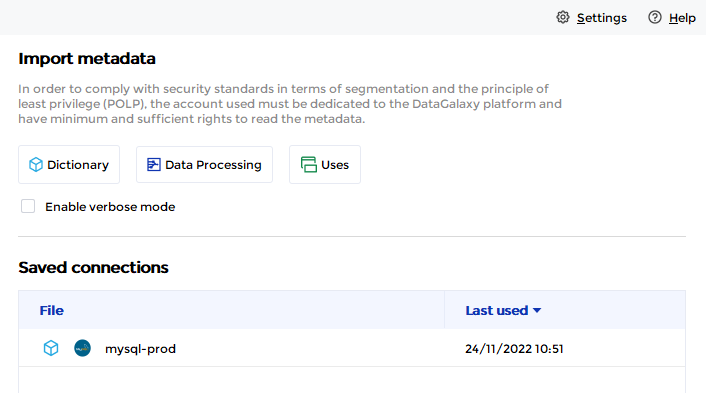
- If it has been correctly installed, the MySQL plug-in appears in the list
- The following information is requested:
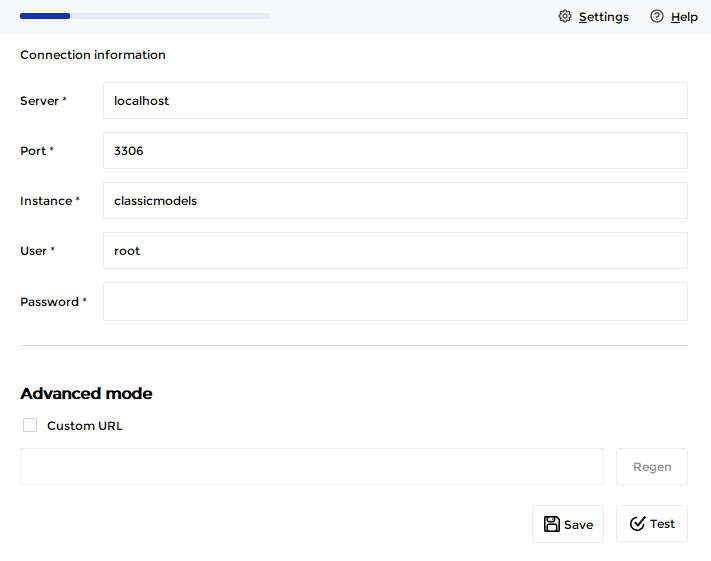
Parameter | Mandatory | Description |
| Server | Yes | MySQL Server name |
| Port | Yes | MySQL Server port |
| Instance | Yes | MySQL instance name |
| User | Yes | |
| Password | Yes | |
| Advanced mode | No | Option to customize the JDBC URL used to connect |
Once these information filled, you can test the connection and start the import.
Releases
| Date | Plugin Version | DataGalaxy release | Desktop Connector version (minimum) | Description |
| 16/07/2026 | 5.3.0 | 3.379.0 | 5.18.5 | Retrieval of stored procedure now supported in URN mode |
| 23/01/2026 | 4.0.3 | v3.302.1 | 5.15.4 | Orphaned handling feature bugfix for urn mode |
| 29/12/2025 | 4.0.2 | v3.295.1 | 5.15.4 | Orphaned handling feature bugfix for urn mode |
| 06/09/2024 | 3.1.0 | v3.72.1 | 5.2.9 | Migrated from MySQL driver to MariaDB driver |
| 06/08/2024 | 3.0.0 | v3.65.0 | 5.0.5 | Migrated from java 11 to java 17 + CVE fixes |