
This article describes how DB2 connector works.
This connector is available in the following modes:
| Desktop mode ✅ | SaaS Online mode ❌ |
Starting from version 4.0.0, the IBM JDBC driver is no more embedded in the DataGalaxy plugin. You'll have to download it from IBM portal choosing the one compatible with your environment and add it to the lib/ directory of the connector, next to the plugin.
Connector scope
The DB2 connector allows you to connect to a DB2 database server running on a Windows or Linux operating system (for DB2 databases on IBM AS400 servers, we invite you to use the AS400/DB2 plugin). The corresponding objects will be reassembled in a Relational type source.
The extracted objects and their correspondences are detailed in the following table:
| DB2 Object | DataGalaxy Object |
| Schema | Model (Conteneur) |
| Table / View | Table / View (structure) |
| Column | Column |
| Primary Key | Primary Key |
| Foreign Key | Foreign Key |
Step 1 : Installation
- Download DataGalaxy connector from the portal (see here)
- Extract the connector archive in the directory of your choice
- Download the DB2 plug-in from the portal and copy it into the /lib directory of the connector
Step 2 : Run DB2 connector
- After starting the connector, access to Dictionary connectors:
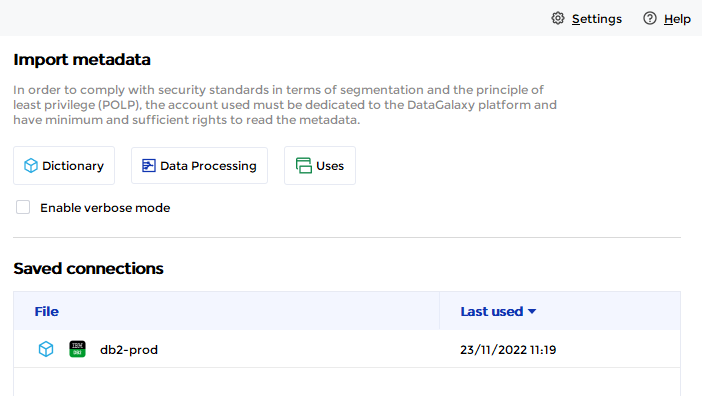
- If it has been correctly installed, the DB2 plug-in appears in the list
- The following information is requested:
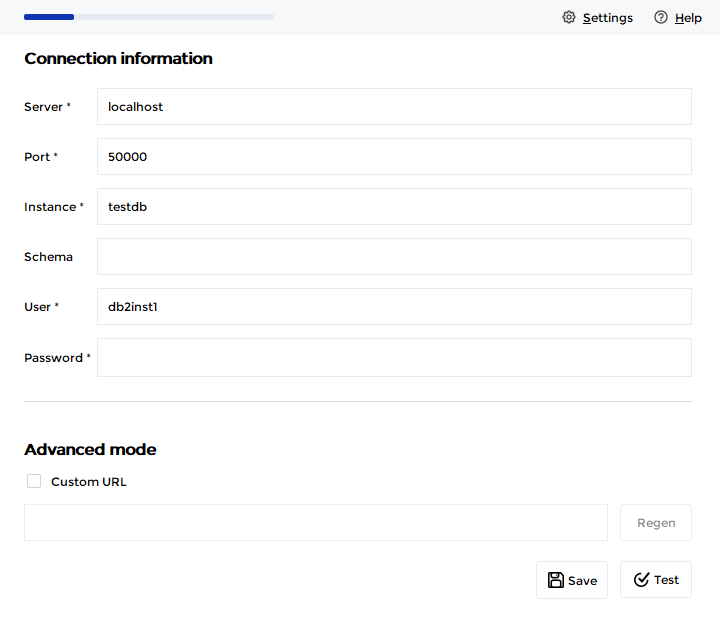
| Parameter | Mandatory | Description |
| Server | Yes | |
| Instance | Yes | |
| Port | Yes | |
| Schema | No | Limits the scope to the specified schema |
| User | Yes | |
| Password | Yes | |
| Advanced Mode | Non | Option to customize the JDBC URL used during the connection |
Technical information
Starting from version 4.0.0, the IBM JDBC driver is no more embedded in the DataGalaxy plugin. You'll have to download it from IBM portal choosing the one compatible with your environment and add it to the lib/ directory of the connector, next to the plugin.
Drivers are available here: https://www.ibm.com/support/pages/db2-jdbc-driver-versions-and-downloads
If you're using DB2 for z/OS, use this page: https://www.ibm.com/support/pages/db2-jdbc-driver-versions-and-downloads-db2-zos.
We have noticed issues on some versions of DB2 for some customers. DataGalaxy support team will not be able to help you on investigating on issues on this system.
Releases
| Date | Plugin Version | DataGalaxy release | Desktop Connector version (minimum) | Description |
| 07/07/2026 | 5.0.0 | v3.376.0 | 5.18.2 | New internal implementation |
| 28/08/2024 | 4.0.0 | v3.70.0 | 5.2.6 | Removed driver from package. Bring your own driver |
| 30/07/2024 | 3.0.0 | v3.63.0 | 5.0.4 | Migrated from java 11 to java 17 + CVE fixes |