
The propulse of this article is to explain:
- What are the different types of communications from DataGalaxy?
- What is the purpose of these communications?
- How can I set them up?
In order not to miss any communication from DataGalaxy, we offer you the possibility to subscribe to different mailing lists according to your wishes.
Types of communications
We offer you 5 types of communications to which you can subscribe:
- DataGalaxy News: To be informed about all the events concerning DataGalaxy, such as shows.
- Data News: To receive information about Data news such as white papers or articles.
- Product News: To be informed of all new features concerning the DataGalaxy platform
- DataGalaxy's Community News: To be informed about DataGalaxy community events like user groups.
- Partner News: To receive communications from DataGalaxy partners.
For each of these communications, you have the choice to be informed via email, or inapp.
How to set up your communication preferences?
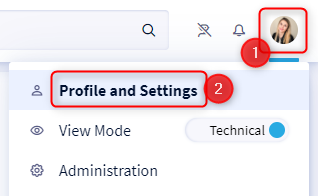
- Access your profile by clicking on your icon at the top right of the screen
- Click on Profile and Settings in the drop-down menu
- Click on Preferences in the left-hand menu
- Click on the Communications tab
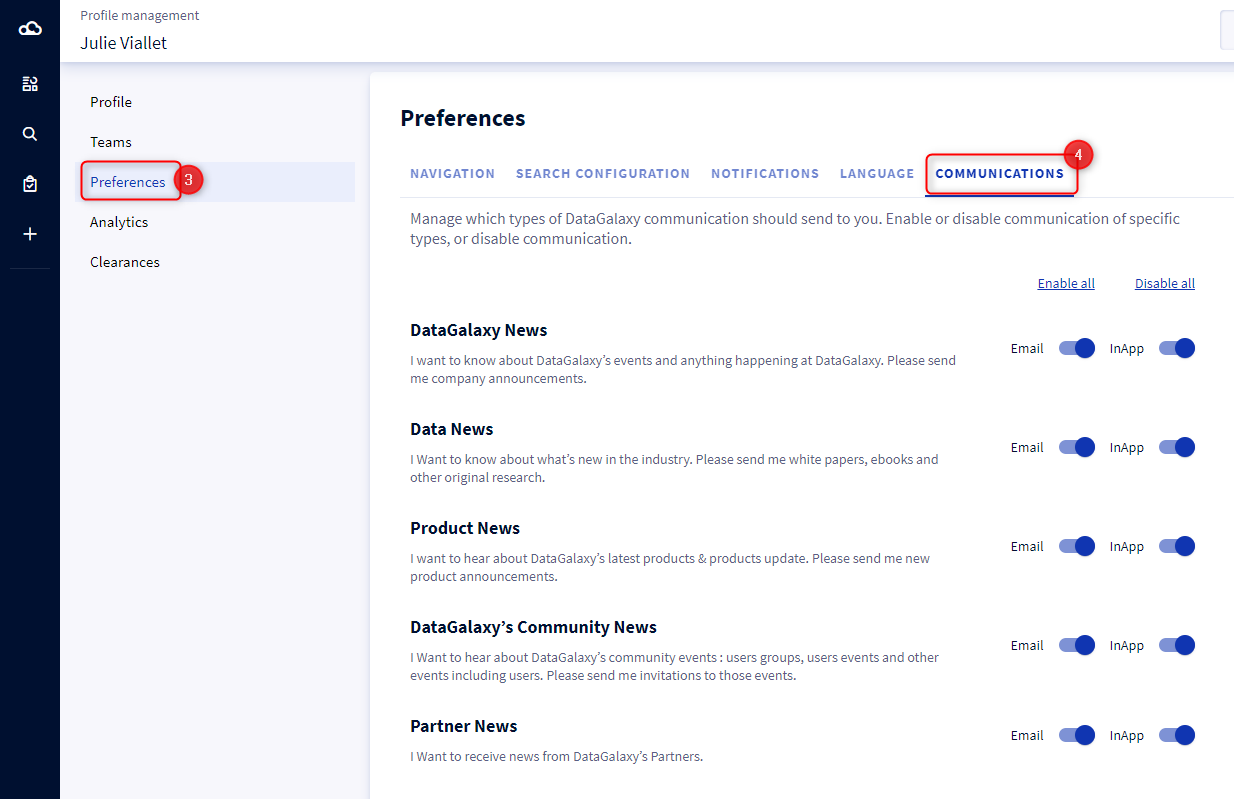
- For each type of communication, you have the possibility to subscribe or unsubscribe from the mailing list, either by sending an email, or by using the toggle buttons.