
This article explains how the SAP BusinnesObjects (BO) connector for DataGalaxy works.
This connector is available in the following modes:
| Desktop mode ✅ | SaaS Online mode ❌ |
Connector Overview
The connector allows to retrieve metadata from a server SAP BusinnesObjects. The retrieved objects and their correspondences in DataGalaxy are detailed in the following table:
| SAP BO object | DataGalaxy Object | Comments |
|---|---|---|
| Folder | Application | The tree of folders and subfolders are imported as an application in a root application (to be named during setup) in the Usage module. |
| Universe | Data Set | |
| Report | Report |
Step 1: Installation
- Download DataGalaxy connector from the portal (see here)
- Extract the connector archive in the directory of your choice
- Download the SAP BusinnesObjects plug-in from the portal and copy it into the /lib directory of the connector
Step 2: Running the SAP BusinessObject (BO) connector
- After starting the connector, access Software type connectors:
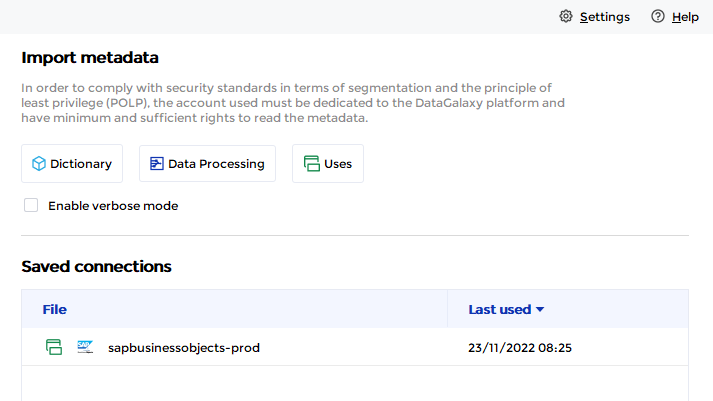
- If it has been correctly installed, the SAP BusinessObject (BO) plug-in appears in the list
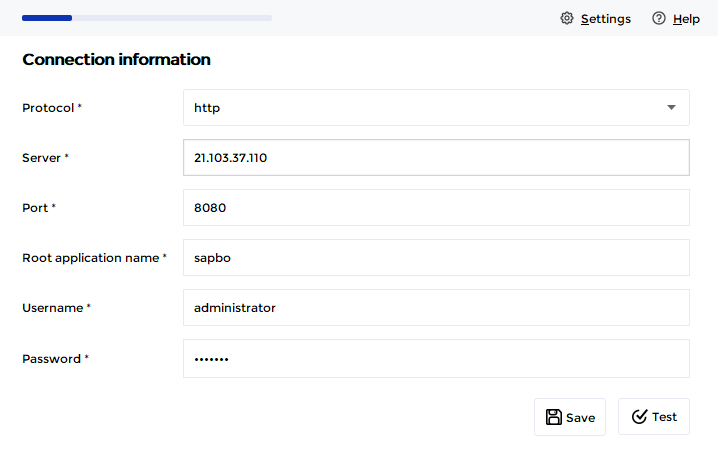
- The following information is requested:
| Parameter | Mandatory | Description |
| Protocol | Yes | Choice of protocol: https or http |
| Server | Yes | SAP BusinessObject server name |
| Port | Yes | SAP BusinessObject server port |
| Root application name | Yes | Name of the "parent" application in the DataGalaxy Usage module, which will be used to store all universes and reports of the SAP BusinessObjects (BO) tool. If the application does not exist, it will be created during the import. |
| Username | Yes | Enterprise Authentication only |
| Password | Yes | Enterprise Authentication only |
Technical Information
The DataGalaxy connector uses the CMS Query REST APIs available starting with BusinessObjects version 4.2 SP03 https://help.sap.com/viewer/db6a17c0d1214fd6971de66ea0122378/4.2.4/en-US/ca2bd2aedebe4972ad9d26f0e80eb784.html
Releases
| Date | Plugin Version | DataGalaxy release | Desktop Connector version (minimum) | Description |
| 23/08/2024 | 5.0.1 | v3.69.0 | 5.2.3 | Updated the logger to show more information when using verbose mode |
| 06/08/2024 | 5.0.0 | v3.65.0 | 5.0.5 | Migrated from java 11 to java 17 + CVE fixes |