
This article explains how the Power BI Report Server (On-Premises) connector for DataGalaxy works.
This connector is available in the following modes:
| Desktop mode ✅ | SaaS Online mode ❌ |
Connector scope
The connector imports the following metadata from Power BI Report Server:
Folders and their contents : sub folders, Reports, KPIs, DataSets and DataSources
Fields of a DataSet
Links between KPIs and DataSets fields
Links between Reports / DataSets and DataSources
By default, the following attributes are populated for the entire scope:
- Functional and technical labels
Description
Additional attributes are also filled in depending on the type of object. To make them visible in DataGalaxy screens, it may be necessary to adapt the screens of the concerned objects. See this article to learn more about screen customization.
The following table details the objects and attributes retrieved, and their correspondences in DataGalaxy :
| Power BI Report Server object | DataGalaxy object | DataGalaxy attributes | Comments |
| Folder | Application | Technical type, Last modification date, Creation date of the source object | Each items in the Power BI Report Server tool is imported in a root application (to be named during configuration) in the Usage module. |
| KPI | Screen | Technical type Last modification date, Creation date of the source object | |
| Report / Report Power BI | Report | Technical type Last modification date, Creation date of the source object | |
| DataSource | Data Set | Technical type, Last modification date, Creation date of the source object, Link to source | |
| DataSet | Data Set | Technical type, | |
| Field of a DataSet | Field |
Step 1: Installation
- Download DataGalaxy connector from the portal (see here)
- Extract the connector archive in the directory of your choice
- Download the Power BI Report Server plug-in from the portal and copy it into the /lib directory of the connector
Step 2: Running the Power BI Report Server connector
- After starting the connector, access Software type connectors:
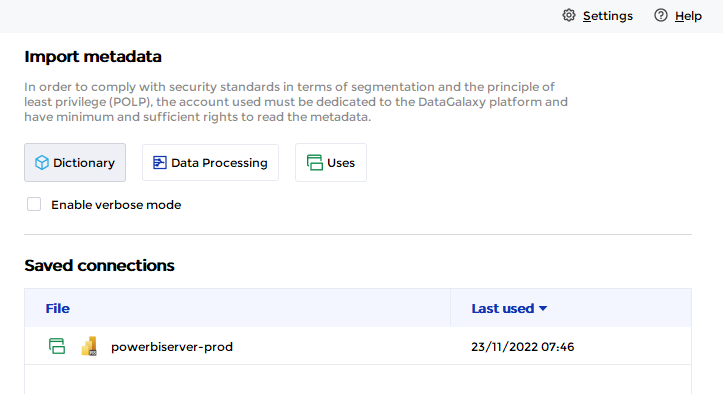
- If it has been correctly installed, the Power BI Report Server plug-in appears in the list
- The following information is requested:
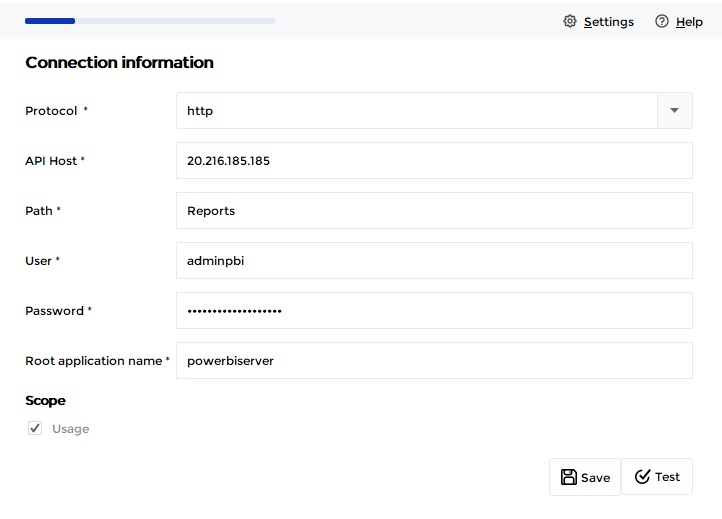
| Parameter | Mandatory | Description |
Protocol | Yes | Choice of protocol: https or http |
| API Host | Yes | Power BI Report Server name or IP address |
| Path | Yes | Virtual path or directory as configured in the configuration manager (see here for more information) Reports is the default value configured for this parameter |
| User | Yes | Name of the user |
| Password | Yes | |
| Root application name | Yes | Name of the "parent" application in the DataGalaxy Usage module, which will be used to store all items of the Power BI Report Server tool. If the application does not exist, it will be created during the import. |
Technical Information
Power BI Report Server connector uses Microsoft's REST APIs.
Authentication is done using NTLM (Power BI Report Server default authentification mode).
The account used to retrieve the metadata must have the following rights:
- View reports
- View resources
- View folders
- View data sources
- View models
We invite you to create a specific role with these authorizations and to assign it to the desired user account at the root level of the report server (more information on the editor's website: https://docs.microsoft.com/en-us/sql/reporting-services/security/role-definitions-create-delete-or-modify).
The Browser role available by default in Power BI Report Server can be used if you don't want to create a specific one. However, please note that it does not have the View data sources right, and that the corresponding elements will therefore not be brought up in DataGalaxy (not blocking for the execution of the connector).
Releases
| Date | Plugin Version | DataGalaxy release | Desktop Connector version (minimum) | Description |
| 19/05/2026 | 4.0.3 | v3.340.0 | 5.15.12 | Fixed a bug linked to the casing of folder paths |
| 19/05/2026 | 4.0.2 | v3.340.0 | 5.15.12 | Fixed a bug linked to the order in which folders are resolved |
| 23/08/2024 | 4.0.1 | v3.69.0 | 5.2.3 | Updated the logger to show more information when using verbose mode |
| 06/08/2024 | 4.0.0 | v3.65.0 | 5.0.5 | Migrated from java 11 to java 17 + CVE fixes |